<!DOCTYPE html>
	<html lang="vi" xmlns="http://www.w3.org/1999/xhtml" prefix="og: http://ogp.me/ns#">
	<head>
<title>Hướng dẫn tạo đề thi cho giáo viên tham gia cuộc thi “Giáo viên khởi nghiệp”</title>
<meta name="description" content="Hướng dẫn tạo đề thi cho giáo viên tham gia cuộc thi “Giáo viên khởi nghiệp” - Savefile - Tin Tức -...">
<meta name="author" content="Hệ thống thi trắc nghiệm trực tuyến">
<meta name="copyright" content="Hệ thống thi trắc nghiệm trực tuyến [cuccntt@moet.edu.vn]">
<meta name="robots" content="index, archive, follow, noodp">
<meta name="googlebot" content="index,archive,follow,noodp">
<meta name="msnbot" content="all,index,follow">
<meta name="generator" content="NukeViet v4.3">
<meta name="viewport" content="width=device-width, initial-scale=1">
<meta http-equiv="Content-Type" content="text/html; charset=utf-8">
<meta property="og:title" content="Hướng dẫn tạo đề thi cho giáo viên tham gia cuộc thi “Giáo viên khởi nghiệp”">
<meta property="og:type" content="website">
<meta property="og:description" content="Savefile - Tin Tức - https&#x3A;&#x002F;&#x002F;thithutructuyen.com&#x002F;news&#x002F;savefile&#x002F;tin-tuc-giao-duc&#x002F;huong-dan-tao-de-thi-cho-giao-vien-tham-gia-cuoc-thi-giao-vien-khoi-nghiep-732.html">
<meta property="og:site_name" content="Hệ thống thi trắc nghiệm trực tuyến">
<meta property="og:url" content="https://thithutructuyen.com/news/tin-tuc-giao-duc/huong-dan-tao-de-thi-cho-giao-vien-tham-gia-cuoc-thi-giao-vien-khoi-nghiep-732.html">
<link rel="shortcut icon" href="https://thithutructuyen.com/uploads/logo_116_95.jpg">
<link rel="canonical" href="https://thithutructuyen.com/news/tin-tuc-giao-duc/huong-dan-tao-de-thi-cho-giao-vien-tham-gia-cuoc-thi-giao-vien-khoi-nghiep-732.html">
<link rel="alternate" href="https://thithutructuyen.com/news/rss/" title="Tin Tức" type="application/rss+xml">
<link rel="alternate" href="https://thithutructuyen.com/news/rss/tin-tuc-thong-bao/" title="Tin Tức - Tin tức - Thông báo" type="application/rss+xml">
<link rel="alternate" href="https://thithutructuyen.com/news/rss/tin-tuc-giao-duc/" title="Tin Tức - Tin tức giáo dục" type="application/rss+xml">
<link rel="alternate" href="https://thithutructuyen.com/news/rss/tin-tuc-doanh-nghiep/" title="Tin Tức - Tin tức doanh nghiệp" type="application/rss+xml">
<link rel="preload" as="script" href="https://thithutructuyen.com/assets/js/jquery/jquery.min.js">
<link rel="preload" as="script" href="https://thithutructuyen.com/assets/js/language/vi.js">
<link rel="preload" as="script" href="https://thithutructuyen.com/assets/js/global.js">
<link rel="preload" as="script" href="https://thithutructuyen.com/themes/cuccntt/js/news.js">
<link rel="preload" as="script" href="https://thithutructuyen.com/themes/cuccntt/js/main.js">
<link rel="preload" as="script" href="https://thithutructuyen.com/themes/cuccntt/js/bootstrap.min.js">
<link rel="StyleSheet" href="https://thithutructuyen.com/assets/css/font-awesome.min.css">
<link rel="StyleSheet" href="https://thithutructuyen.com/themes/cuccntt/css/bootstrap.min.css">
<link rel="StyleSheet" href="https://thithutructuyen.com/themes/cuccntt/css/style.css">
<link rel="StyleSheet" href="https://thithutructuyen.com/themes/cuccntt/css/style.responsive.css">
<link rel="StyleSheet" href="https://thithutructuyen.com/themes/cuccntt/css/news.css">
<link rel="StyleSheet" href="https://thithutructuyen.com/assets/css/cuccntt.vi.0.css?t=1637722611">
<style>
	body{background: #fff;}
</style>
<script data-show="inline">(function(i,s,o,g,r,a,m){i['GoogleAnalyticsObject']=r;i[r]=i[r]||function(){
(i[r].q=i[r].q||[]).push(arguments)},i[r].l=1*new Date();a=s.createElement(o),
m=s.getElementsByTagName(o)[0];a.async=1;a.src=g;m.parentNode.insertBefore(a,m)
})(window,document,'script','https://www.google-analytics.com/analytics.js','ga');
ga('create', 'UA-209981721-2', '.thithutructuyen.com');
ga('send', 'pageview');
</script>
</head>
	<body>
<div id="print">
	<div id="hd_print">
		<h2 class="pull-left">Hệ thống thi trắc nghiệm trực tuyến</h2>
		<p class="pull-right"><a title="Hệ thống thi trắc nghiệm trực tuyến" href="https://thithutructuyen.com/">https://thithutructuyen.com</a></p>
	</div>
	<div class="clear"></div>
	<hr />
	<div id="content">
		<h1>Hướng dẫn tạo đề thi cho giáo viên tham gia cuộc thi “Giáo viên khởi nghiệp”</h1>
		<ul class="list-inline">
			<li>Thứ năm - 22/09/2022 03:57</li>
			<li class="hidden-print txtrequired"><em class="fa fa-print">&nbsp;</em><a title="In ra" href="javascript:;" onclick="window.print()">In ra</a></li>
			<li class="hidden-print txtrequired"><em class="fa fa-power-off">&nbsp;</em><a title="Đóng cửa sổ này" href="javascript:;" onclick="window.close()">Đóng cửa sổ này</a></li>
		</ul>
		<div class="clear"></div>
		<div id="hometext">
			Sau khi đăng ký khởi tạo site thành công, việc quan trọng cần làm của giáo viên là đưa đề thi của mình lên trang để nhiều người biết đến và tham gia thi. Bài viết sau đây sẽ hướng dẫn đến giáo viên đang tham gia cuộc thi “Giáo viên khởi nghiệp” các bước để tạo một đề thi hoàn chỉnh lên website mà mình đang quản lý.
		</div>
		<div id="bodytext" class="clearfix">
			<p dir="ltr" role="presentation" style="text-align: justify;"><strong>Sau khi đăng ký khởi tạo site thành công, việc quan trọng cần làm của giáo viên là đưa đề thi của mình lên trang để nhiều người biết đến và tham gia thi. Bài viết sau đây sẽ hướng dẫn đến giáo viên đang tham gia cuộc thi “Giáo viên khởi nghiệp” các bước để tạo một đề thi hoàn chỉnh lên website mà mình đang quản lý.</strong></p>

<p dir="ltr" role="presentation" style="text-align: center;"><iframe align="middle" allow="accelerometer; autoplay; clipboard-write; encrypted-media; gyroscope; picture-in-picture" allowfullscreen="" frameborder="0" height="500" scrolling="no" src="https://www.youtube.com/embed/cdIbDrGvwkM" title="YouTube video player" width="800"></iframe><br  />
<em>Video:&nbsp;Hướng dẫn tạo đề thi cho giáo viên tham gia cuộc thi “Giáo viên khởi nghiệp”</em></p>

<h2 dir="ltr" role="presentation" style="text-align: justify;">1. Tạo đề thi thủ công</h2>

<p dir="ltr" style="text-align: justify;">Tạo đề thi thủ công là thao tác đăng tải đề thi trực tiếp lên hệ thống. Cách tạo này áp dụng cho những đề thi có số lượng câu hỏi ít vì giáo viên sẽ phải tạo từng câu hỏi một cách thủ công. Với những đề thi có số lượng câu hỏi lớn, khuyến khích giáo viên sử dụng hình thức&nbsp;<strong>tạo đề bằng file Word</strong>&nbsp;hoặc&nbsp;<strong>tạo đề bằng file Excel</strong>&nbsp;để tiết kiệm thời gian.</p>

<p dir="ltr" style="text-align: justify;">Để tạo đề thi thủ công các bạn thực hiện theo các bước sau:<br  />
<br  />
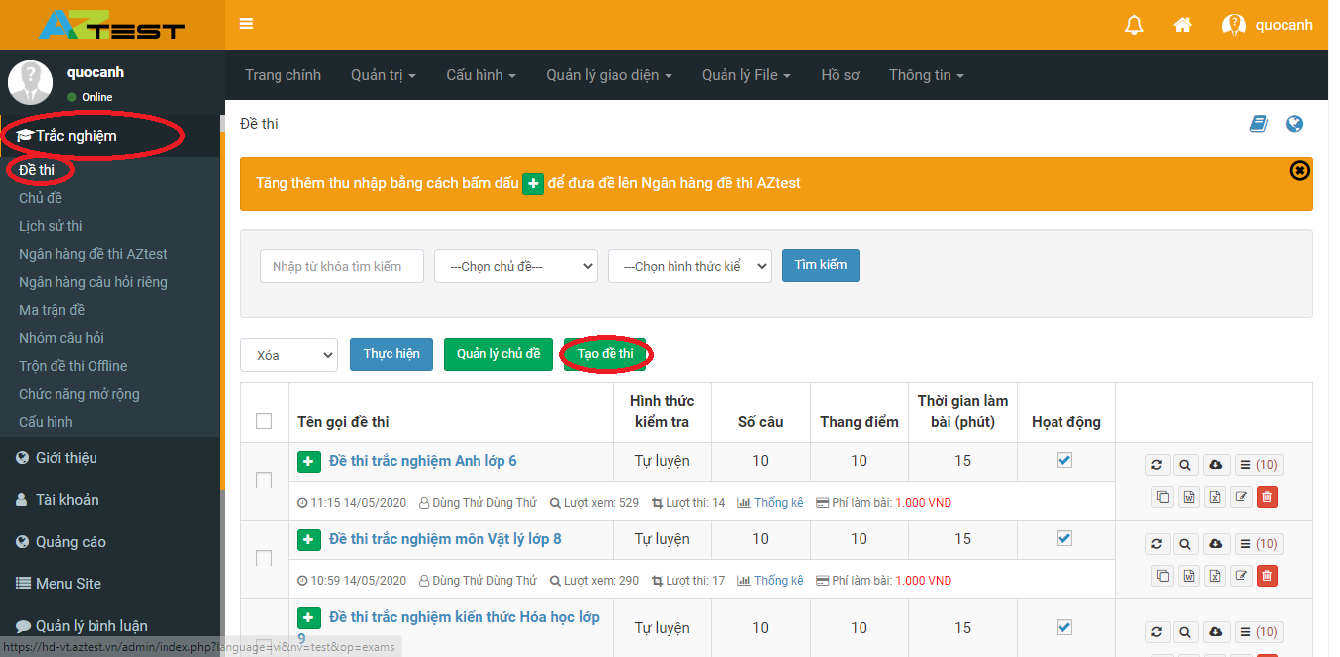
<u><strong>Bước 1:</strong></u>&nbsp;Chọn&nbsp;<strong>Trắc nghiệm -&gt; Đề thi -&gt; Tạo đề thi</strong></p>

<figure>
<div style="text-align: justify;">
<div style="text-align:center"><img alt="tạo đề thi" height="392" src="https://aztest.vn/uploads/news/2022/tao-de-thi.png" width="800" /></div>
</div>

<figcaption>
<div><em>Hướng dẫn tạo đề thi cho giáo viên tham gia cuộc thi “Giáo viên khởi nghiệp”</em></div>
</figcaption>
</figure>

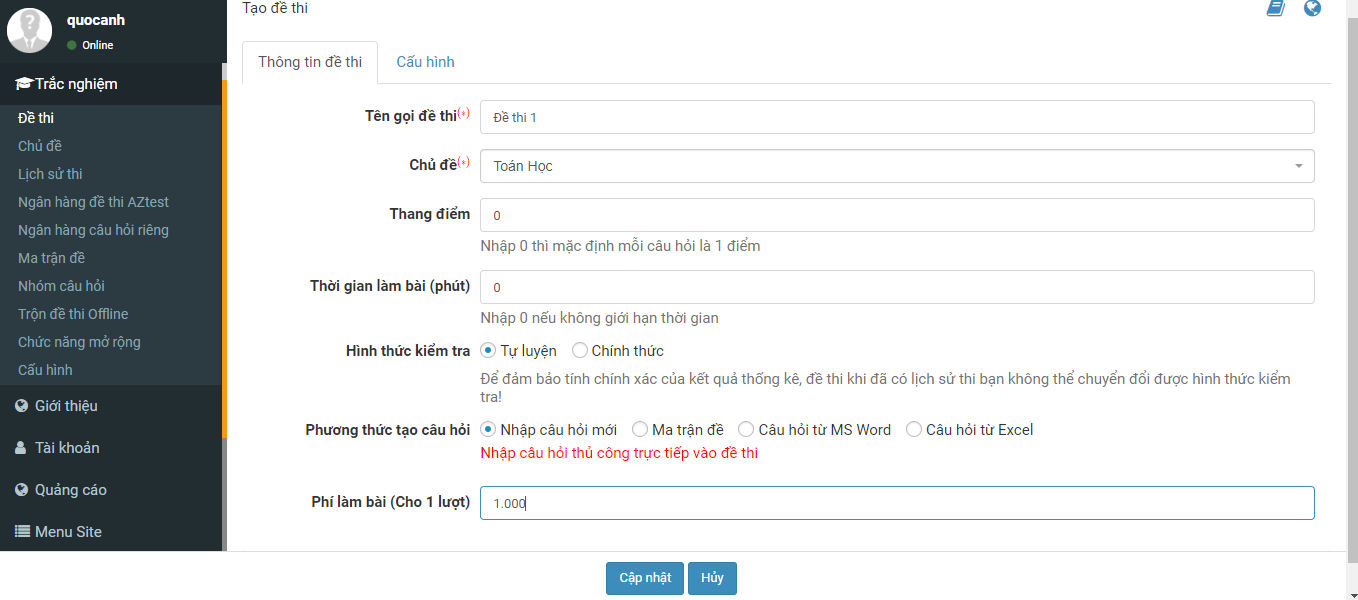
<p dir="ltr" style="text-align: justify;"><u><strong>Bước 2:</strong></u>&nbsp;Điền thông tin cho đề thi của bạn&nbsp;</p>

<figure>
<div style="text-align: justify;">
<div style="text-align:center"><img alt="điền tt đề thi" height="353" src="https://aztest.vn/uploads/news/2022/dien-tt-de-thi.png" width="800" /></div>
</div>

<figcaption>
<div><em>Hướng dẫn tạo đề thi cho giáo viên tham gia cuộc thi “Giáo viên khởi nghiệp”</em></div>
</figcaption>
</figure>

<p dir="ltr" style="text-align: justify;"><em><u><strong>Lưu ý:</strong></u>&nbsp;Ở phần này bạn cần nhập phí làm bài tối thiểu 1.000đ</em><br  />
<br  />
Sau khi đã hoàn tất các bước chọn&nbsp;<strong>Cập nhật</strong><br  />
<br  />
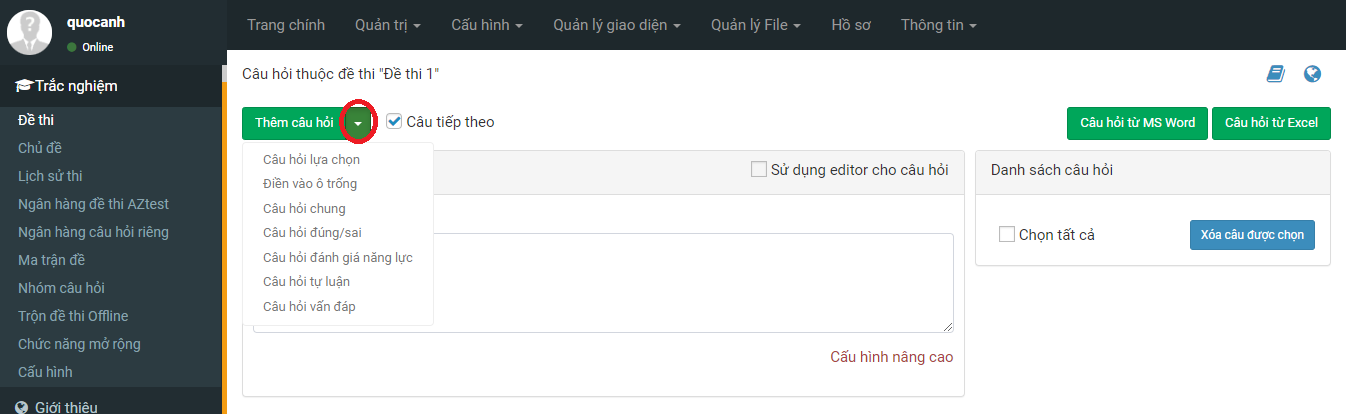
<u><strong>Bước 3:</strong></u>&nbsp;Chọn kiểu câu hỏi bạn muốn tạo</p>

<figure>
<div style="text-align: justify;">
<div style="text-align:center"><img alt="kiểu câu hỏi" height="246" src="https://aztest.vn/uploads/news/2022/kieu-cau-hoi.png" width="800" /></div>
</div>

<figcaption>
<div><em>Hướng dẫn tạo đề thi cho giáo viên tham gia cuộc thi “Giáo viên khởi nghiệp”</em></div>
</figcaption>
</figure>

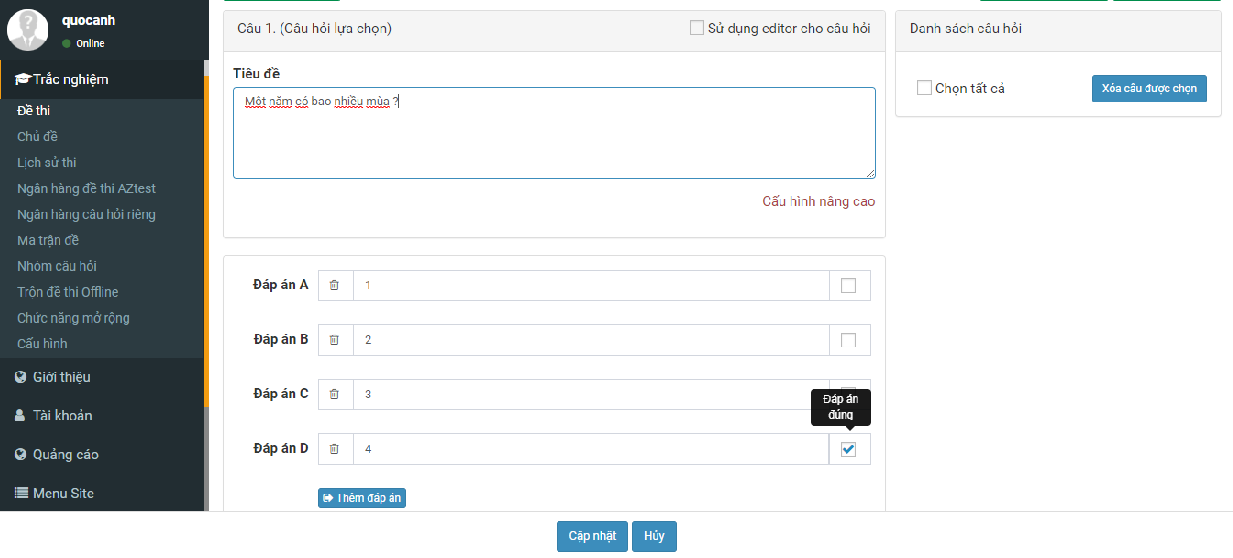
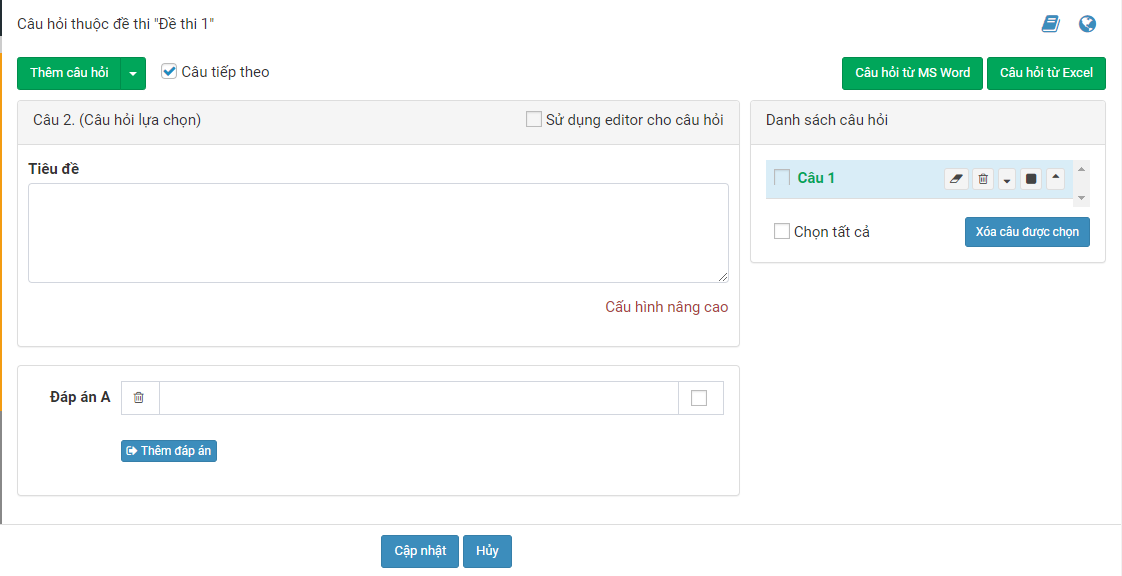
<p dir="ltr" style="text-align: justify;"><u><strong>Bước 4:</strong></u>&nbsp;Nhập thông tin đầy đủ cho câu hỏi đó và đáp án đối với kiểu câu hỏi trắc nghiệm và sau đó chọn&nbsp;<strong>Cập nhật.</strong></p>

<figure>
<div style="text-align: justify;">
<div style="text-align:center"><img alt="nhập câu hỏi và đa" height="362" src="https://aztest.vn/uploads/news/2022/nhap-cau-hoi-va-da.png" width="800" /></div>
</div>

<figcaption>
<div><em>Hướng dẫn tạo đề thi cho giáo viên tham gia cuộc thi “Giáo viên khởi nghiệp”</em></div>
</figcaption>
</figure>

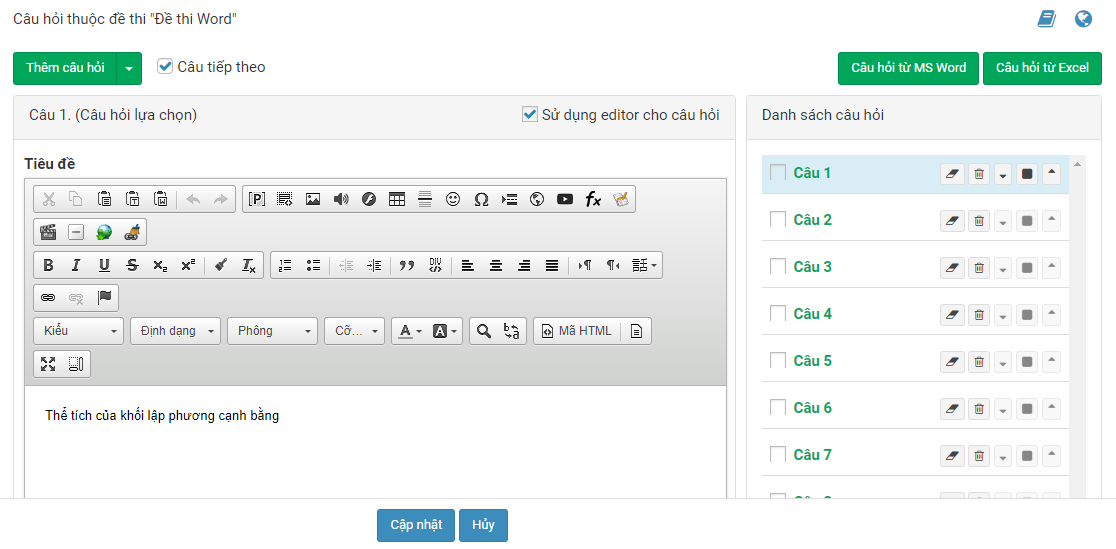
<p dir="ltr" style="text-align: justify;"><u><strong>Bước 5:</strong></u>&nbsp;Xuất hiện câu hỏi tiếp và tiếp tục tạo câu hỏi của bạn</p>

<figure>
<div style="text-align: justify;">
<div style="text-align:center"><img alt="tạo câu hỏi (tt)" height="411" src="https://aztest.vn/uploads/news/2022/tao-cau-hoi-tt.png" width="800" /></div>
</div>

<figcaption>
<div><em>Hướng dẫn tạo đề thi cho giáo viên tham gia cuộc thi “Giáo viên khởi nghiệp”</em></div>
</figcaption>
</figure>

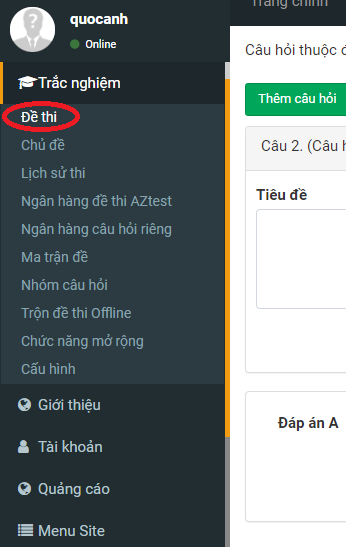
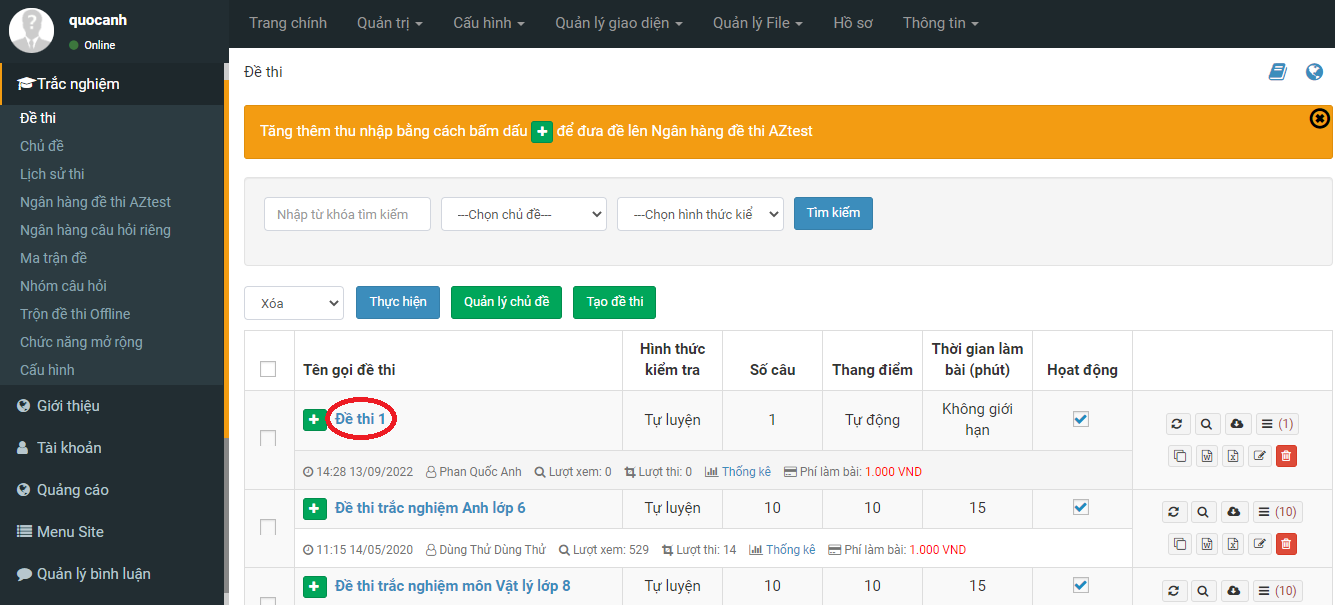
<p dir="ltr" style="text-align: justify;"><u><strong>Bước 6:</strong></u>&nbsp;Chọn&nbsp;<strong>Đề thi&nbsp;</strong>ở bên trái Menu và sau đó chọn đề thi đã tạo để kiểm tra và làm thử đề thi ngoài site.</p>

<figure>
<div style="text-align: justify;">
<div style="text-align:center"><img alt="ktra đề thi" height="547" src="https://aztest.vn/uploads/news/2022/ktra-de-thi.png" width="346" /></div>
</div>

<figcaption>
<div><em>Hướng dẫn tạo đề thi cho giáo viên tham gia cuộc thi “Giáo viên khởi nghiệp”</em></div>
</figcaption>
</figure>

<figure>
<div style="text-align: justify;">
<div style="text-align:center"><img alt="ktra đề thi (2)" height="363" src="https://aztest.vn/uploads/news/2022/ktra-de-thi-2.png" width="800" /></div>
</div>

<figcaption>
<div><em>Hướng dẫn tạo đề thi cho giáo viên tham gia cuộc thi “Giáo viên khởi nghiệp”</em></div>
</figcaption>
</figure>

<figure>
<div style="text-align: justify;">
<div style="text-align:center"><img alt="Sau khi tạo xong, đề thi sẽ được hiển thị bên ngoài site" height="642" src="https://aztest.vn/uploads/news/2022/banner-gvkn.png" width="800" /></div>
</div>

<figcaption>
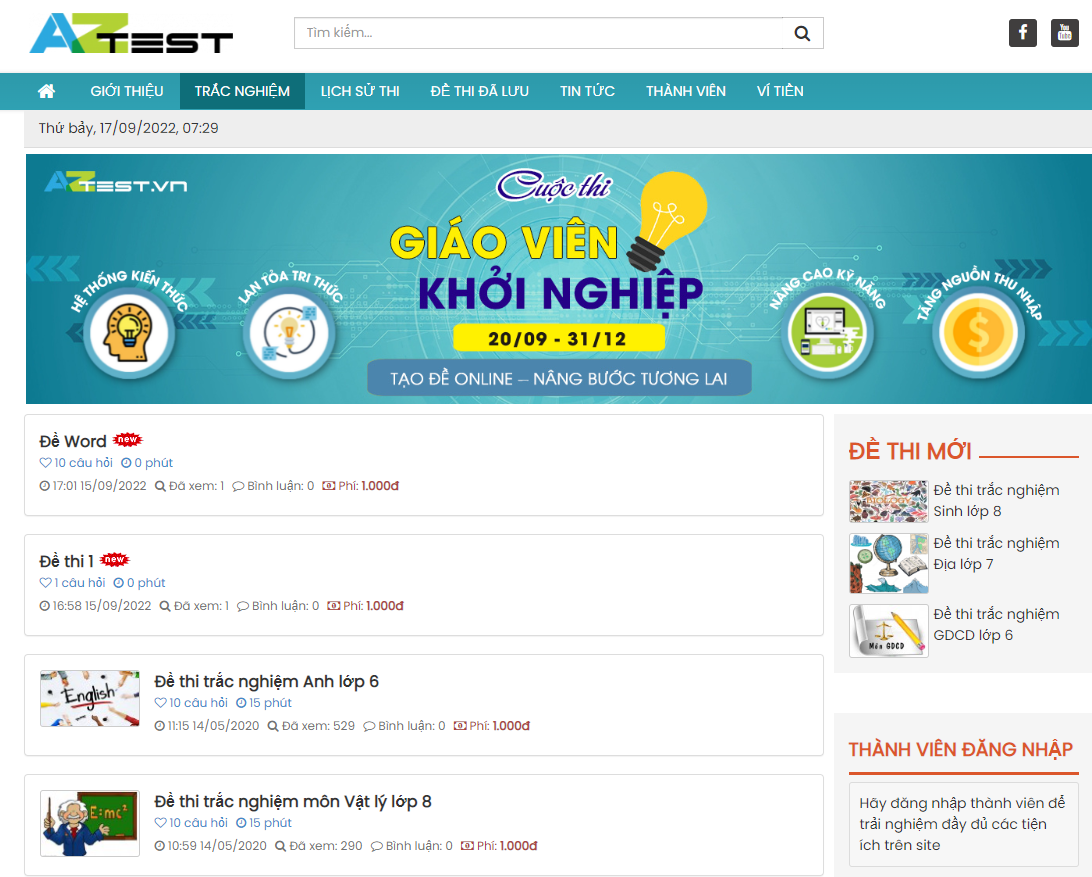
<div><em>Sau khi tạo xong, đề thi sẽ được hiển thị bên ngoài site</em></div>
</figcaption>
</figure>

<h2 dir="ltr" role="presentation" style="text-align: justify;">2. Tạo đề thi bằng file MS Word</h2>

<p dir="ltr" style="text-align: justify;">Như đã nói ở trên với những đề thi có số lượng câu hỏi lớn bạn nên sử dụng tính năng tạo đề thi bằng file Word để có thể đưa được nhiều câu hỏi lên cùng một lúc.&nbsp;</p>

<p dir="ltr" style="text-align: justify;">Thao tác này vô cùng đơn giản, bạn chỉ điều chỉnh file Word mình đang có theo đúng định dạng (format) quy định của phần mềm, sau đó vào trang quản trị tải file Word có chứa các câu hỏi của đề thi lên, trong vòng vài giây sau đó Đề thi của bạn đã nhanh chóng được đưa lên hệ thống!<br  />
<br  />
<strong>Để tạo đề thi bằng file MS Word, bạn cần làm theo các bước sau:</strong><br  />
<br  />
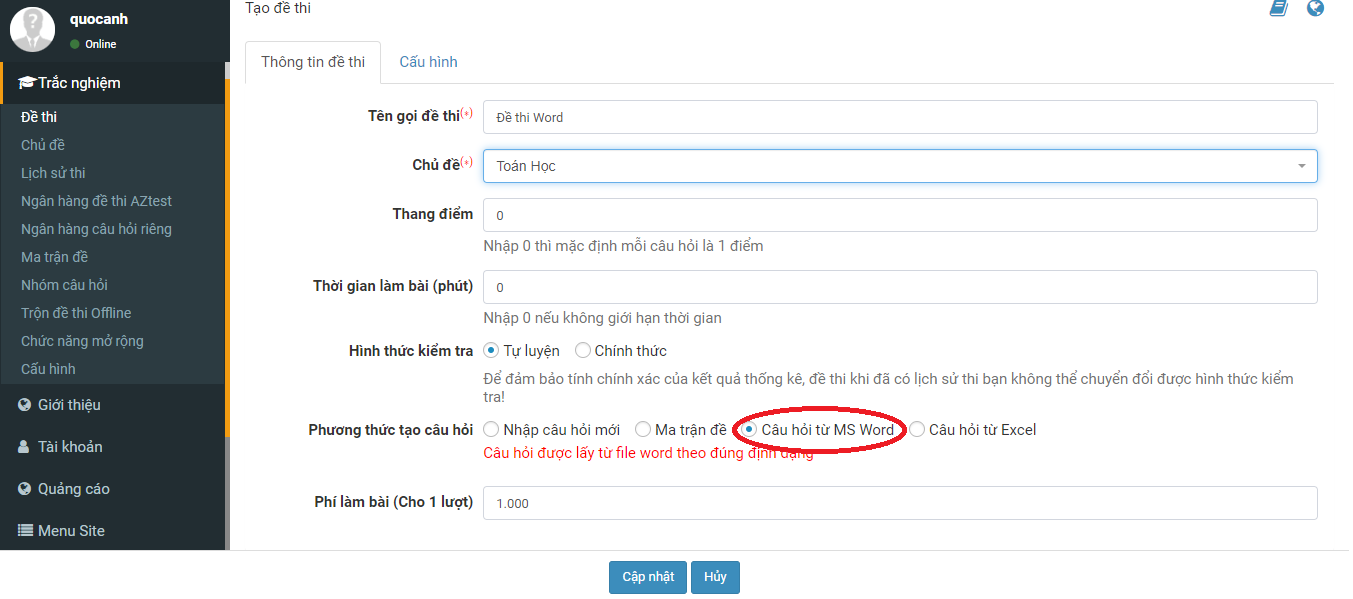
<u><strong>Bước 1:</strong></u>&nbsp;Bạn vào&nbsp;<strong>Trắc nghiệm -&gt; Đề thi -&gt; Tạo đề thi</strong>, điền các thông tin yêu cầu. Sau đó ở phần Phương thức tạo câu hỏi chọn&nbsp;<strong>Câu hỏi từ MS Word&nbsp;</strong>-&gt; Chọn<strong>&nbsp;Cập nhật</strong>.</p>

<figure>
<div style="text-align: justify;">
<div style="text-align:center"><img alt="tạo đề thi từ file word" height="354" src="https://aztest.vn/uploads/news/2022/tao-de-thi-tu-file-word.png" width="800" /></div>
</div>

<figcaption>
<div><em>Hướng dẫn tạo đề thi cho giáo viên tham gia cuộc thi “Giáo viên khởi nghiệp”</em></div>
</figcaption>
</figure>

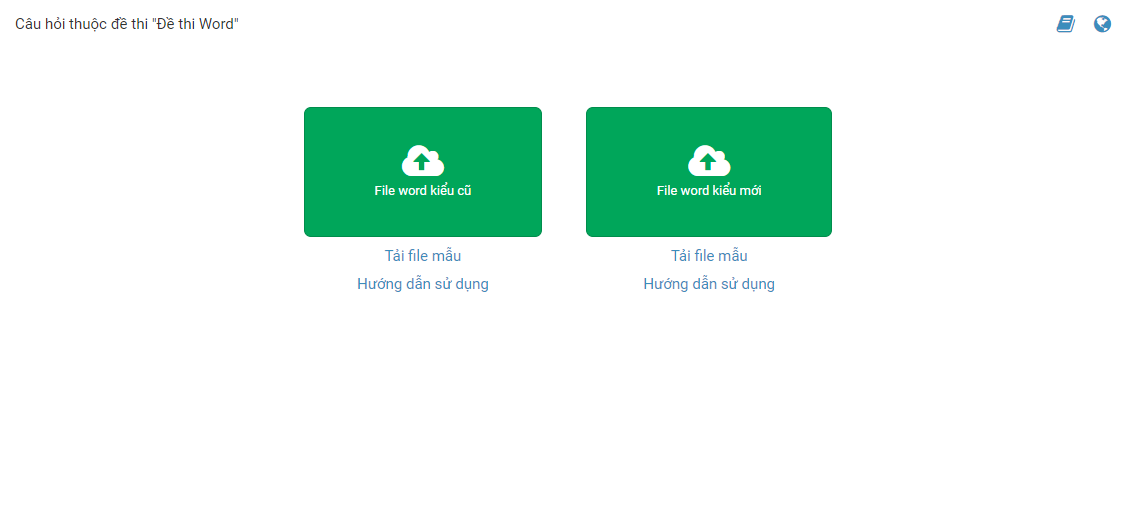
<p dir="ltr" style="text-align: justify;"><u><strong>Bước 2:</strong></u>&nbsp;Tải file mẫu Word (nên chọn file Word kiểu mới) và xem hướng dẫn ở&nbsp;<strong><a href="https://aztest.vn/tin-tuc/thong-bao/huong-dan-cach-import-de-thi-tu-file-ms-word-kieu-moi-889.html">Hướng dẫn sử dụng</a></strong>.</p>

<figure>
<div style="text-align: justify;">
<div style="text-align:center"><img alt="file word kiểu mới" height="358" src="https://aztest.vn/uploads/news/2022/file-word-kieu-moi.png" width="800" /></div>
</div>

<figcaption>
<div><em>Hướng dẫn tạo đề thi cho giáo viên tham gia cuộc thi “Giáo viên khởi nghiệp”</em></div>
</figcaption>
</figure>

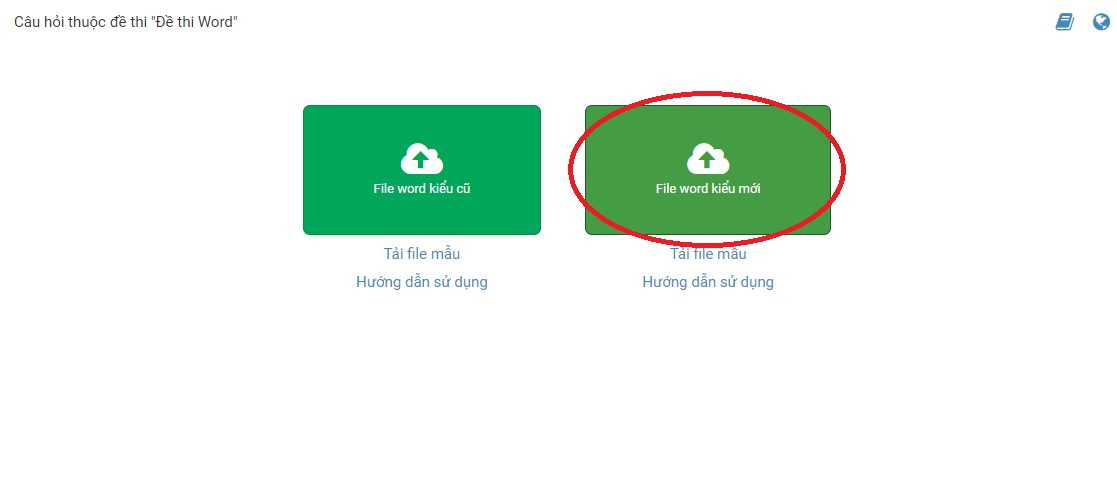
<p dir="ltr" style="text-align: justify;"><u><strong>Bước 3:</strong></u>&nbsp;Khi đã có file Word làm theo đúng format phần mềm yêu cầu thì bạn đưa lên phần mềm bằng cách click vào khung chữ nhật màu xanh (được đánh dấu). Sau đó tải file Word của bạn lên.&nbsp;<em>Bạn đợi phần mềm xử lý trong giây lát.</em></p>

<figure>
<div style="text-align: justify;">
<div style="text-align:center"><img alt="file word kiểu mới (2)" height="360" src="https://aztest.vn/uploads/news/2022/file-word-kieu-moi-2.png" width="800" /></div>
</div>

<figcaption>
<div><em>Hướng dẫn tạo đề thi cho giáo viên tham gia cuộc thi “Giáo viên khởi nghiệp”</em></div>
</figcaption>
</figure>

<p dir="ltr" style="text-align: justify;"><u><strong>Bước 4:</strong></u>&nbsp;Sau khi đã tải đề thi lên, hệ thống sẽ hiện giao diện thông tin đề thi. Bạn kiểm tra kỹ, sau đó nhấn chọn&nbsp;<strong>Cập nhật.</strong></p>

<figure>
<div style="text-align: justify;">
<div style="text-align:center"><img alt="ktra đề" height="360" src="https://aztest.vn/uploads/news/2022/ktra-de.png" width="800" /></div>
</div>

<figcaption>
<div><em>Hướng dẫn tạo đề thi cho giáo viên tham gia cuộc thi “Giáo viên khởi nghiệp”</em></div>
</figcaption>
</figure>

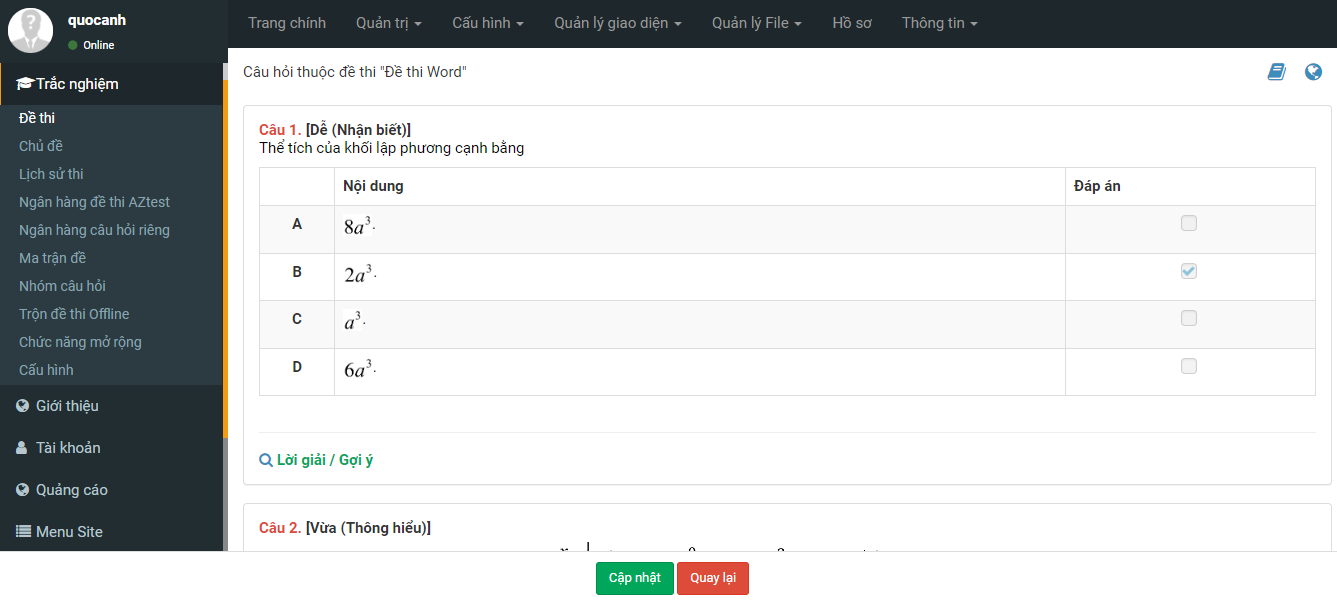
<p dir="ltr" style="text-align: justify;"><u><strong>Bước 5:</strong></u>&nbsp;Sau khi hoàn tất bước trên, giao diện sẽ được hiển thị như hình bên dưới. Bạn kiểm tra và có thể thay đổi thông tin nếu muốn. Xong bạn nhấn&nbsp;<strong>Cập nhật.</strong>&nbsp;</p>

<figure>
<div style="text-align: justify;">
<div style="text-align:center"><img alt="thêm câu hỏi" height="394" src="https://aztest.vn/uploads/news/2022/them-cau-hoi.png" width="800" /></div>
</div>

<figcaption>
<div><em>Hướng dẫn tạo đề thi cho giáo viên tham gia cuộc thi “Giáo viên khởi nghiệp”</em></div>
</figcaption>
</figure>

<p dir="ltr" style="text-align: justify;">Như vậy các bước đã được thao tác thành công, bạn hãy thi thử đề của mình để kiểm tra lại lần cuối sau đó gửi link đề cho học sinh nhé!</p>

<p dir="ltr" style="text-align: justify;">Bài viết trên đây đã hướng dẫn bạn các bước tạo đề thi bằng cách thủ công và tạo bằng file Word, để tạo đề bằng file Excel, bạn xem thêm hướng dẫn tại đây:&nbsp;<strong><a href="https://aztest.vn/huong-dan-su-dung/huong-dan-import-cau-hoi-tu-file-excel-len-aztest-17.html">Hướng dẫn import câu hỏi từ file Excel lên AZtest</a></strong>.<br  />
<br  />
Trong quá trình tham gia Cuộc thi, có bất kỳ thắc mắc nào bạn có thể liên hệ đến hotline&nbsp;&nbsp;<a href="tel:093.478.2468"><span style="color:rgb(192, 57, 43);"><strong>093.478.2468</strong></span></a>&nbsp;hoặc inbox&nbsp;<strong><a href="https://www.facebook.com/aztest.vn">Fanpage AZtest</a></strong>.</p>
		</div>
				<div id="author">
						<p>
				<strong>Nguồn tin:</strong>
				aztest.vn
			</p>
		</div>
	</div>
	<div id="footer" class="clearfix">
		<div id="url">
			<strong>URL của bản tin này: </strong><a href="https://thithutructuyen.com/news/tin-tuc-giao-duc/huong-dan-tao-de-thi-cho-giao-vien-tham-gia-cuoc-thi-giao-vien-khoi-nghiep-732.html" title="Hướng dẫn tạo đề thi cho giáo viên tham gia cuộc thi “Giáo viên khởi nghiệp”">https://thithutructuyen.com/news/tin-tuc-giao-duc/huong-dan-tao-de-thi-cho-giao-vien-tham-gia-cuoc-thi-giao-vien-khoi-nghiep-732.html</a>

		</div>
		<div class="clear"></div>
		<div class="copyright">
			&copy; Hệ thống thi trắc nghiệm trực tuyến
		</div>
		<div id="contact">
			<a href="mailto:cuccntt@moet.edu.vn">cuccntt@moet.edu.vn</a>
		</div>
	</div>
</div>
        <div id="timeoutsess" class="chromeframe">
            Bạn đã không sử dụng Site, <a onclick="timeoutsesscancel();" href="https://thithutructuyen.com/#">Bấm vào đây để duy trì trạng thái đăng nhập</a>. Thời gian chờ: <span id="secField"> 60 </span> giây
        </div>
        <div id="openidResult" class="nv-alert" style="display:none"></div>
        <div id="openidBt" data-result="" data-redirect=""></div>
<div id="run_cronjobs" style="visibility:hidden;display:none;"><img alt="" src="/index.php?second=cronjobs&amp;p=q1i3SKXX" width="1" height="1" /></div>
<script src="https://thithutructuyen.com/assets/js/jquery/jquery.min.js"></script>
<script>var nv_base_siteurl="/",nv_lang_data="vi",nv_lang_interface="vi",nv_name_variable="nv",nv_fc_variable="op",nv_lang_variable="language",nv_module_name="news",nv_func_name="savefile",nv_is_user=0, nv_my_ofs=-4,nv_my_abbr="EDT",nv_cookie_prefix="nv4c_a9vJI",nv_check_pass_mstime=1738000,nv_area_admin=0,nv_safemode=0,theme_responsive=1,nv_is_recaptcha=0;</script>
<script src="https://thithutructuyen.com/assets/js/language/vi.js"></script>
<script src="https://thithutructuyen.com/assets/js/global.js"></script>
<script src="https://thithutructuyen.com/themes/cuccntt/js/news.js"></script>
<script src="https://thithutructuyen.com/themes/cuccntt/js/main.js"></script>
<script src="https://thithutructuyen.com/themes/cuccntt/js/bootstrap.min.js"></script>
</body>
</html>