<!DOCTYPE html>
	<html lang="vi" xmlns="http://www.w3.org/1999/xhtml" prefix="og: http://ogp.me/ns#">
	<head>
<title>Tạo đề thi trắc nghiệm online trên AZtest khó hay dễ?</title>
<meta name="description" content="Tạo đề thi trắc nghiệm online trên AZtest khó hay dễ? - Savefile - Tin Tức -...">
<meta name="author" content="Hệ thống thi trắc nghiệm trực tuyến">
<meta name="copyright" content="Hệ thống thi trắc nghiệm trực tuyến [cuccntt@moet.edu.vn]">
<meta name="robots" content="index, archive, follow, noodp">
<meta name="googlebot" content="index,archive,follow,noodp">
<meta name="msnbot" content="all,index,follow">
<meta name="generator" content="NukeViet v4.3">
<meta name="viewport" content="width=device-width, initial-scale=1">
<meta http-equiv="Content-Type" content="text/html; charset=utf-8">
<meta property="og:title" content="Tạo đề thi trắc nghiệm online trên AZtest khó hay dễ?">
<meta property="og:type" content="website">
<meta property="og:description" content="Savefile - Tin Tức - https&#x3A;&#x002F;&#x002F;thithutructuyen.com&#x002F;news&#x002F;savefile&#x002F;tin-tuc-giao-duc&#x002F;tao-de-thi-trac-nghiem-online-tren-aztest-kho-hay-de-532.html">
<meta property="og:site_name" content="Hệ thống thi trắc nghiệm trực tuyến">
<meta property="og:url" content="https://thithutructuyen.com/news/tin-tuc-giao-duc/tao-de-thi-trac-nghiem-online-tren-aztest-kho-hay-de-532.html">
<link rel="shortcut icon" href="https://thithutructuyen.com/uploads/logo_116_95.jpg">
<link rel="canonical" href="https://thithutructuyen.com/news/tin-tuc-giao-duc/tao-de-thi-trac-nghiem-online-tren-aztest-kho-hay-de-532.html">
<link rel="alternate" href="https://thithutructuyen.com/news/rss/" title="Tin Tức" type="application/rss+xml">
<link rel="alternate" href="https://thithutructuyen.com/news/rss/tin-tuc-thong-bao/" title="Tin Tức - Tin tức - Thông báo" type="application/rss+xml">
<link rel="alternate" href="https://thithutructuyen.com/news/rss/tin-tuc-giao-duc/" title="Tin Tức - Tin tức giáo dục" type="application/rss+xml">
<link rel="alternate" href="https://thithutructuyen.com/news/rss/tin-tuc-doanh-nghiep/" title="Tin Tức - Tin tức doanh nghiệp" type="application/rss+xml">
<link rel="preload" as="script" href="https://thithutructuyen.com/assets/js/jquery/jquery.min.js">
<link rel="preload" as="script" href="https://thithutructuyen.com/assets/js/language/vi.js">
<link rel="preload" as="script" href="https://thithutructuyen.com/assets/js/global.js">
<link rel="preload" as="script" href="https://thithutructuyen.com/themes/cuccntt/js/news.js">
<link rel="preload" as="script" href="https://thithutructuyen.com/themes/cuccntt/js/main.js">
<link rel="preload" as="script" href="https://thithutructuyen.com/themes/cuccntt/js/bootstrap.min.js">
<link rel="StyleSheet" href="https://thithutructuyen.com/assets/css/font-awesome.min.css">
<link rel="StyleSheet" href="https://thithutructuyen.com/themes/cuccntt/css/bootstrap.min.css">
<link rel="StyleSheet" href="https://thithutructuyen.com/themes/cuccntt/css/style.css">
<link rel="StyleSheet" href="https://thithutructuyen.com/themes/cuccntt/css/style.responsive.css">
<link rel="StyleSheet" href="https://thithutructuyen.com/themes/cuccntt/css/news.css">
<link rel="StyleSheet" href="https://thithutructuyen.com/assets/css/cuccntt.vi.0.css?t=1637722611">
<style>
	body{background: #fff;}
</style>
<script data-show="inline">(function(i,s,o,g,r,a,m){i['GoogleAnalyticsObject']=r;i[r]=i[r]||function(){
(i[r].q=i[r].q||[]).push(arguments)},i[r].l=1*new Date();a=s.createElement(o),
m=s.getElementsByTagName(o)[0];a.async=1;a.src=g;m.parentNode.insertBefore(a,m)
})(window,document,'script','https://www.google-analytics.com/analytics.js','ga');
ga('create', 'UA-209981721-2', '.thithutructuyen.com');
ga('send', 'pageview');
</script>
</head>
	<body>
<div id="print">
	<div id="hd_print">
		<h2 class="pull-left">Hệ thống thi trắc nghiệm trực tuyến</h2>
		<p class="pull-right"><a title="Hệ thống thi trắc nghiệm trực tuyến" href="https://thithutructuyen.com/">https://thithutructuyen.com</a></p>
	</div>
	<div class="clear"></div>
	<hr />
	<div id="content">
		<h1>Tạo đề thi trắc nghiệm online trên AZtest khó hay dễ?</h1>
		<ul class="list-inline">
			<li>Thứ hai - 24/08/2020 04:37</li>
			<li class="hidden-print txtrequired"><em class="fa fa-print">&nbsp;</em><a title="In ra" href="javascript:;" onclick="window.print()">In ra</a></li>
			<li class="hidden-print txtrequired"><em class="fa fa-power-off">&nbsp;</em><a title="Đóng cửa sổ này" href="javascript:;" onclick="window.close()">Đóng cửa sổ này</a></li>
		</ul>
		<div class="clear"></div>
		<div id="hometext">
			Với những người dùng mới bắt đầu sử dụng phần mềm thi trắc nghiệm AZtest có lẽ câu hỏi mà họ thắc mắc nhất là việc tạo đề thi trắc nghiệm online khó hay dễ? Để giúp cho người dùng có thể nắm được các bước tạo đề thi một cách nhanh chóng, hiệu quả bài viết hôm nay của chúng tôi sẽ giúp bạn trả lời cho câu hỏi này. Cùng theo dõi nhé.
		</div>
				<div class="imghome">
			<img alt="Tạo đề thi trắc nghiệm online trên AZtest khó hay dễ?" src="https://thithutructuyen.com/uploads/news/2020_08/aztest_2.jpg" width="460" class="img-thumbnail" />
		</div>
		<div class="clear"></div>
		<div id="bodytext" class="clearfix">
			<h2><strong>1. AZtest phần mềm tạo đề thi trắc nghiệm online hiệu quả, đơn giản, nhanh chóng và dễ dàng?</strong></h2>

<div style="text-align: justify;"><span style="font-size:14px;"><span style="font-family:Arial,Helvetica,sans-serif;">Với thời đại 4.0 hiện nay thì hình thức thi online ngày càng trở nên phổ biến hơn. Thay vì người dùng phải soạn đề và in đề trên giấy thì nay với cách tạo <strong><a href="https://aztest.vn/">đề thi trắc nghiệm online</a></strong> trên AZtest sẽ giúp cho người dùng tiết kiệm được thời gian, chi phí trong quá trình tạo đề và in đề. Vậy AZtest là phần mềm thi trắc nghiệm online như thế nào?<br  />
Ra đời vào năm 2016 AZtest là&nbsp;hệ thống tổ chức thi trắc nghiệm trực tuyến do&nbsp;<strong><a href="https://tddfoss.vn/">CÔNG TY TNHH PHÁT TRIỂN VÀ DỊCH VỤ NGUỒN MỞ THUẬN ĐỨC</a></strong>&nbsp;phát triển hướng đến đối tượng là cá nhân/trung tâm/ trường học/doanh nghiệp có thể tạo đề thi trắc nghiệm trực tuyến một cách nhanh chóng và khoa học, người dự thi có thể làm bài thi trắc nghiệm trên máy, được chấm điểm sau khi hoàn thành bài thi.<br  />
Với&nbsp;<strong>AZtest</strong>, người dùng có thể dễ dàng tạo lập cho mình một website tổ chức ôn tập,<strong>&nbsp;</strong><a href="https://aztest.vn/about/gioi-thieu-he-thong-thi-trac-nghiem-aztest.html"><strong>thi trắc nghiệm trực tuyến</strong></a>&nbsp;miễn phí, mà không cần quan tâm đến các vấn đề kỹ thuật. Mỗi website có thể cá nhân hóa tối đa cho người làm chủ, có thể sử dụng tên miền riêng, giao diện, logo riêng,... giúp chủ nhân website có thể nhanh chóng tạo ra thương hiệu riêng.<br  />
Trong quá trình sử dụng phần mềm thi trắc nghiệm AZtest người dùng sẽ có được tính năng hữu ích như:</span></span></div>

<ul>
	<li style="text-align: justify;"><span style="font-size:14px;"><span style="font-family:Arial,Helvetica,sans-serif;">Tạo đề thi theo nhóm và chủ đề, không giới hạn</span></span></li>
	<li style="text-align: justify;"><span style="font-size:14px;"><span style="font-family:Arial,Helvetica,sans-serif;">Nhập đề thi từ Microsoft Word</span></span></li>
	<li style="text-align: justify;"><span style="font-size:14px;"><span style="font-family:Arial,Helvetica,sans-serif;">Phân quyền quản lý thư viện đề thi</span></span></li>
	<li style="text-align: justify;"><span style="font-size:14px;"><span style="font-family:Arial,Helvetica,sans-serif;">Phân quyền thành viên tham gia làm bài</span></span></li>
	<li style="text-align: justify;"><span style="font-size:14px;"><span style="font-family:Arial,Helvetica,sans-serif;">Tạo đề thi&nbsp;<strong>Tự luyện</strong>, hoặc&nbsp;<strong>Chấm điểm</strong></span></span></li>
	<li style="text-align: justify;"><span style="font-size:14px;"><span style="font-family:Arial,Helvetica,sans-serif;">Cấu hình thang điểm, thời gian làm bài</span></span></li>
	<li style="text-align: justify;"><span style="font-size:14px;"><span style="font-family:Arial,Helvetica,sans-serif;">Xem lại lịch sử thi của học sinh</span></span></li>
	<li style="text-align: justify;"><span style="font-size:14px;"><span style="font-family:Arial,Helvetica,sans-serif;">Xếp loại kết quả học sinh tham gia</span></span></li>
	<li style="text-align: justify;"><span style="font-size:14px;"><span style="font-family:Arial,Helvetica,sans-serif;">Hiển thị ngẫu&nbsp;nhiên câu hỏi và đáp án dựa trên đề gốc</span></span></li>
	<li style="text-align: justify;"><span style="font-size:14px;"><span style="font-family:Arial,Helvetica,sans-serif;">Bộ đếm ngược thời gian làm bài, tự động thu bài khi hết giờ.</span></span></li>
</ul>

<div style="text-align: justify;"><span style="font-size:14px;"><span style="font-family:Arial,Helvetica,sans-serif;">Việc khởi tạo hết sức dễ dàng và đơn giản.&nbsp;</span></span><span style="font-size:14px;"><span style="font-family:Arial,Helvetica,sans-serif;">Chúng tôi sẽ tiến hành khởi tạo và gửi thông tin đến bạn qua email. Việc khởi tạo website miễn phí, AZtest cung cấp dịch vụ theo các gói, bạn có thể sử dụng miễn phí hoặc nâng cấp lên các gói cao hơn (trả phí) để sử dụng các tính năng nâng cao. Xem bảng giá của chúng tôi công bố tại&nbsp;<strong><a href="https://aztest.vn/bang-so-sanh-tinh-nang.html">bảng so sánh tính năng</a></strong>.<br  />
<em>&gt;&gt;&gt; Click đăng ký khởi tạo website thi trắc nghiệm trực tuyết <strong><a href="https://aztest.vn/saas/register/free-co-ban/">tại đây</a></strong>.</em></span></span></div>

<h2 dir="ltr" style="text-align: justify;"><strong>2. Các bước tạo đề thi trắc nghiệm online trên AZtest như thế nào? Khó hay dễ?</strong></h2>

<p dir="ltr" style="text-align: justify;"><span style="font-size:14px;"><span style="font-family:Arial,Helvetica,sans-serif;">Nếu bạn là người dùng mố bắt đầu sử dụng phần mềm thi trắc nghiệm online AZtest thì đừng quá lo lắng trong cách tạo đề. Bởi cách bước tạo đề vô cùng đơn giản. Chỉ cần bạn thực hiện theo các bước mà sau đây:</span></span></p>

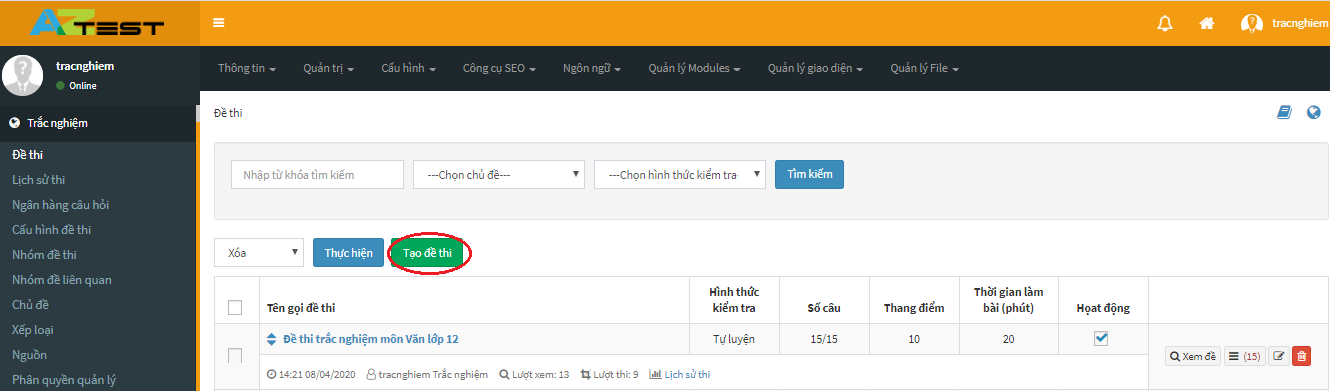
<p dir="ltr" style="text-align: justify;"><span style="font-size:14px;"><span style="font-family:Arial,Helvetica,sans-serif;"><u><strong>Bước 1</strong></u>: Trên giao diện quản trị, truy cập&nbsp;<strong>Trắc nghiệm -&gt; Đề thi -&gt; Tạo đề thi</strong></span></span></p>

<div style="text-align:center"><img alt="" height="177" src="https://lh5.googleusercontent.com/LZ6LvxHwebJmctm5A6kLmT9A6qmv-qAC9pcwIAnH9sxV9LNWZwH3KWhEVdwhTR0bGJN0YsFCEJtvhgcaFfctfuNuq0hrnbEh8e2QeDnOuaJ1HuOgciBLW_W5-noH-POAsp4Yc8EQ" width="602" /></div>

<p dir="ltr" style="text-align: justify;"><span style="font-size:14px;"><span style="font-family:Arial,Helvetica,sans-serif;"><u><strong>Bước 2</strong></u>: Nhập đầy đủ tất cả các trường trước khi nhấn&nbsp;<strong>Cập nhật</strong></span></span></p>

<div style="text-align:center"><img alt="" height="204" src="https://lh5.googleusercontent.com/Ncb3Nuuy-d0mq1UCzaCQIMj77V2o_MrciHxkc2eXVvHnX8KdZoz_9PW5yk8pMpvX1oBoQ-kzlsNoO_XDVFclrmhdaWKSN7JAXR06ND1EA_g_RoPSkZ1neBLpE9lvkjqYLHqX887s" width="602" /></div>

<div style="text-align: justify;"><br  />
<span style="font-size:14px;"><span style="font-family:Arial,Helvetica,sans-serif;">&nbsp;</span></span></div>

<p dir="ltr" style="text-align: justify;"><span style="font-size:14px;"><span style="font-family:Arial,Helvetica,sans-serif;"><em>Lưu ý: Với các đề thi thuộc phân môn tự nhiên, nếu trong nội dung câu hỏi có chứa các công thức toán học, bạn có thể xem thêm chi tiết soạn công thức toán học tại&nbsp;<a href="https://docs.aztest.vn/nhap-cong-thuc-toan-hoc/">Nhập công thức toán học.</a></em></span></span></p>

<p dir="ltr" style="text-align: justify;"><span style="font-size:14px;"><span style="font-family:Arial,Helvetica,sans-serif;"><u><strong>Bước 3</strong></u>: Nhập tương tự cho các thông tin tiếp theo</span></span></p>

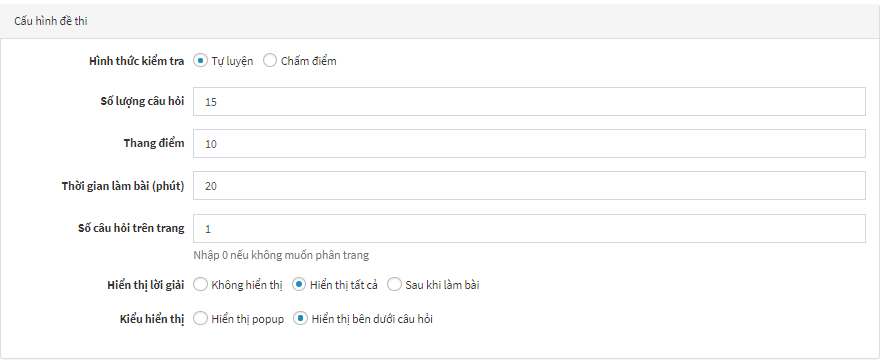
<p dir="ltr" style="text-align: justify;"><span style="font-size:14px;"><span style="font-family:Arial,Helvetica,sans-serif;">Đối với hình thức kiểm tra&nbsp;<strong>Tự luyện</strong>, chúng có những thông tin dưới đây:</span></span></p>

<div style="text-align:center"><img alt="" height="248" src="https://lh6.googleusercontent.com/vtuvmp-U2nVBveU2UTMWld8z_s-3vdiUHJ2xW9xGYLH2UfYS5jTX8JdqZUWLEupvxNWQ65fcpFzoel85f7lKnVzETK4nsSv0rAEchdCNIhQfP_Fz-U0jKWM2mUV8l1YJBKXKi9kc" width="602" /></div>

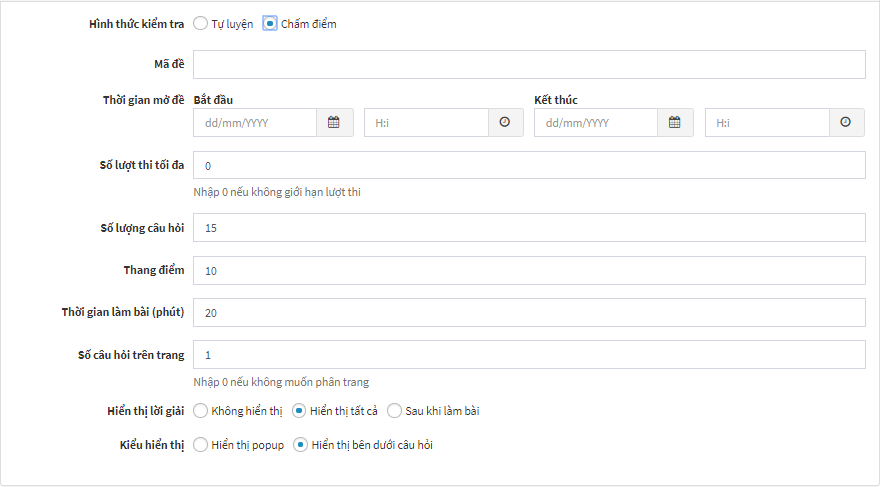
<p dir="ltr" style="text-align: justify;"><span style="font-size:14px;"><span style="font-family:Arial,Helvetica,sans-serif;">Đối với hình thức kiểm tra&nbsp;<strong>Chấm điểm</strong>, chúng có những thông tin dưới đây:</span></span></p>

<p dir="ltr" style="text-align: justify;">&nbsp;</p>

<div style="text-align:center"><img alt="" height="332" src="https://lh5.googleusercontent.com/ZqbRej3OSeNBkQNM4SoHvAswyfy76_K83SKyCSBhQq0G8sb6KBlE8vYe71iipHOWAmUiPHaYfsqIMsU_LC2FIPq2VoRra8JD0WRNswD2plHxy65STkIg7FoCwhCJe5Y85BPv4XcQ" width="602" /></div>

<p dir="ltr" style="text-align: justify;"><span style="font-size:14px;"><span style="font-family:Arial,Helvetica,sans-serif;">Sau khi điền đầy đủ các trường thông tin cần thiết, nhấn&nbsp;<strong>Cập nhật</strong>&nbsp;để thêm đề thi. Dựa vào lựa chọn Phương thức nhập câu hỏi, hệ thống sẽ chuyển bạn đến trang tương ứng để tiếp tục nhập câu hỏi cho đề thi.</span></span></p>

<h3 dir="ltr"><strong>Tính năng quản lý câu hỏi</strong></h3>

<p dir="ltr" style="text-align: justify;"><span style="font-size:14px;"><span style="font-family:Arial,Helvetica,sans-serif;">Sau khi&nbsp;<strong>Tạo Đề thi mới</strong>, chúng ta tiếp tục đến bước&nbsp;<strong>Quản lý Câu hỏi</strong>&nbsp;thông qua việc hoàn thiện các bước&nbsp;<strong>Thêm câu hỏi, Đáp án và Lời giải</strong>.</span></span></p>

<ul>
	<li dir="ltr">
	<p dir="ltr" role="presentation" style="text-align: justify;"><span style="font-size:14px;"><span style="font-family:Arial,Helvetica,sans-serif;">Thêm câu hỏi</span></span></p>
	</li>
</ul>

<p dir="ltr" style="text-align: justify;"><span style="font-size:14px;"><span style="font-family:Arial,Helvetica,sans-serif;">Sau khi nhấn&nbsp;<strong>Cập nhật</strong>&nbsp;ở bước&nbsp;<strong>Tạo Đề thi mới</strong>, giao diện trang xuất hiện câu hỏi:</span></span></p>

<div style="text-align:center"><img alt="" height="249" src="https://lh6.googleusercontent.com/M8yk8bXkAtSjNhNHIJZBdC0-9Bge-jR4UTgzJtTtGeRl5aQQWPWl9uUwvXSXnxUdN7F-txNeiAloolslusRqF5USDAWV7dqxa7mvrRDFRY4zjrttMcomsfZEAa-bUc7geF5ZODYV" width="602" /></div>

<ul>
	<li dir="ltr">
	<p dir="ltr" role="presentation" style="text-align: justify;"><span style="font-size:14px;"><span style="font-family:Arial,Helvetica,sans-serif;">Đáp án</span></span></p>
	</li>
</ul>

<p dir="ltr" style="text-align: justify;"><span style="font-size:14px;"><span style="font-family:Arial,Helvetica,sans-serif;">Sau khi&nbsp;<strong>Thêm Câu hỏi</strong>&nbsp;chúng ta tiếp tục thêm&nbsp;<strong>Đáp án</strong>&nbsp;cho câu hỏi đã tạo:</span></span></p>

<div style="text-align:center"><img alt="" height="385" src="https://lh5.googleusercontent.com/36ZEY79yanj_gqYeG4OxO422kT2-qW4fjHLGIKEVxHBbh9bhHU8uSBU-FpUGzy47D7rfMGH0QFAn4OSKcQn9hZedc14aRfyQJnxRZaWZh-7RknV8P0_XPp9-b68rbFzfEkPAfDsP" width="602" /></div>

<ul>
	<li dir="ltr">
	<p dir="ltr" role="presentation" style="text-align: justify;"><span style="font-size:14px;"><span style="font-family:Arial,Helvetica,sans-serif;">Lời giải</span></span></p>
	</li>
</ul>

<p dir="ltr" style="text-align: justify;"><span style="font-size:14px;"><span style="font-family:Arial,Helvetica,sans-serif;">Lời giải là phần thông tin về cách giải đề hoặc các thông tin liên quan đến đáp án để người dự thi tham khảo. Nhờ phần lời giải người dự thi có thể bổ sung thêm những phần kiến thức chưa biết.</span></span></p>

<p dir="ltr" style="text-align: justify;"><span style="font-size:14px;"><span style="font-family:Arial,Helvetica,sans-serif;">Trong quá trình soạn đề thi, người tạo đề có thể lựa chọn cho phép hiển thị lời giải hoặc không.</span></span></p>

<div style="text-align:center"><img alt="" height="248" src="https://lh4.googleusercontent.com/pHUjkfguJgpq8UJ6WA2IEsiGAc0iwOUJrtiWpklthRgDbjCLmQ53IeVPH4fwwfzJe1AolJwUSo0l1O9BzfrixHkj66hVEOZLJqmU_1582wtRfMopTXLcFj1TVMRu9UHELS423RKA" width="602" /></div>

<p dir="ltr" style="text-align: justify;"><span style="font-size:14px;"><span style="font-family:Arial,Helvetica,sans-serif;">Ở tính năng hiển thị lời giải sẽ hiển thị ở 2 dạng khác nhau:</span></span></p>

<ul>
	<li dir="ltr">
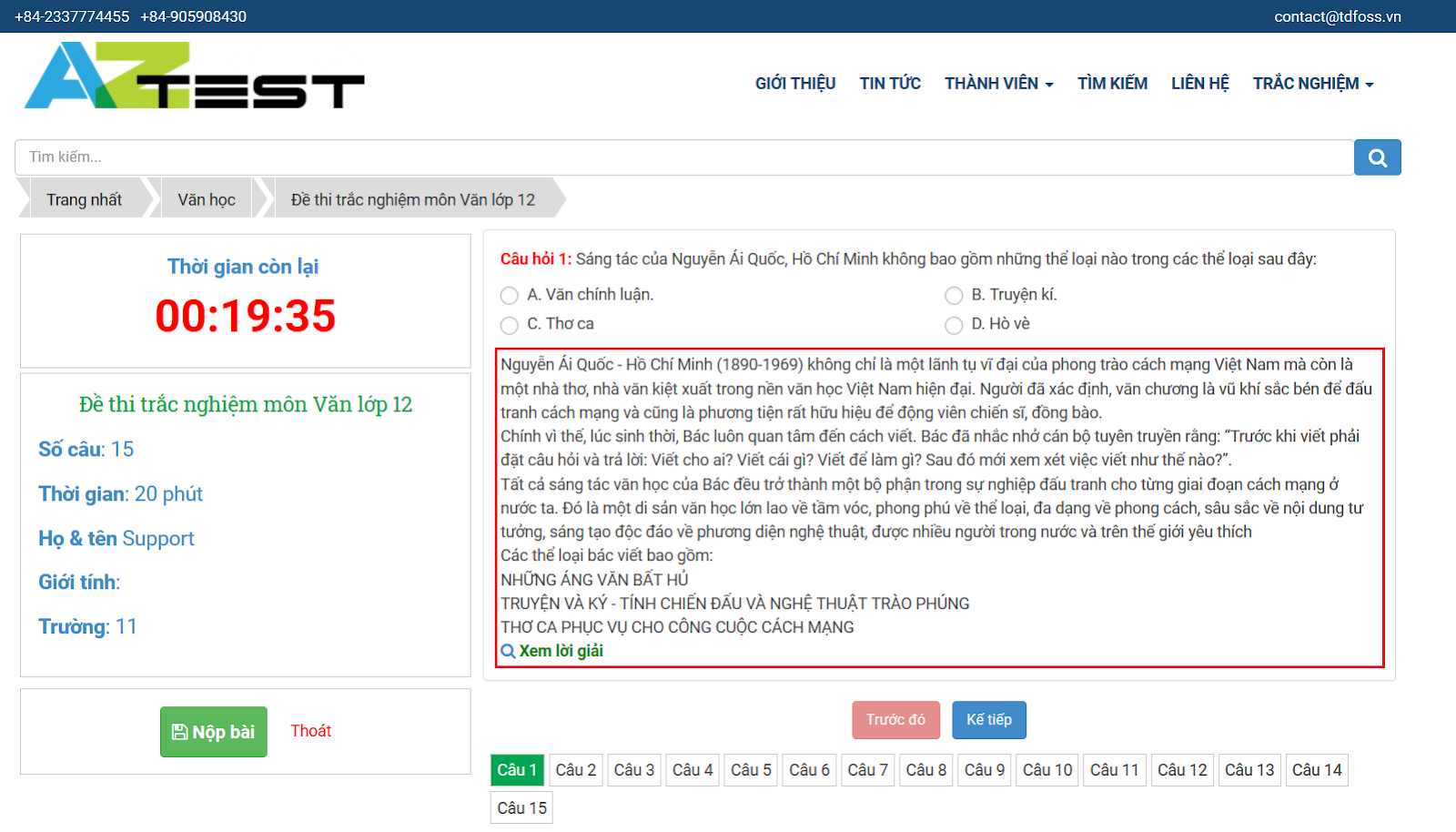
	<p dir="ltr" role="presentation" style="text-align: justify;"><span style="font-size:14px;"><span style="font-family:Arial,Helvetica,sans-serif;">Hiển thị lời giải ngay dưới câu hỏi khi bạn chọn&nbsp;<strong>Hiển thị bên dưới câu hỏi</strong>, như hình bên dưới</span></span></p>
	</li>
</ul>

<div style="text-align:center"><img alt="" height="344" src="https://lh6.googleusercontent.com/ZyP-OM7cLWNjmFvAZn5YM3Hjn8vul-sDK90WzXnjCCZ61WYUAnb0LW7XjAHYZU8RaVdHuADGrG6HYK8bBW5KeAsYPB2LdlShLNCU1M56hMeF6T5Q7xko9F6RnoXS-E2RBLupCgn5" width="602" /></div>

<ul>
	<li dir="ltr">
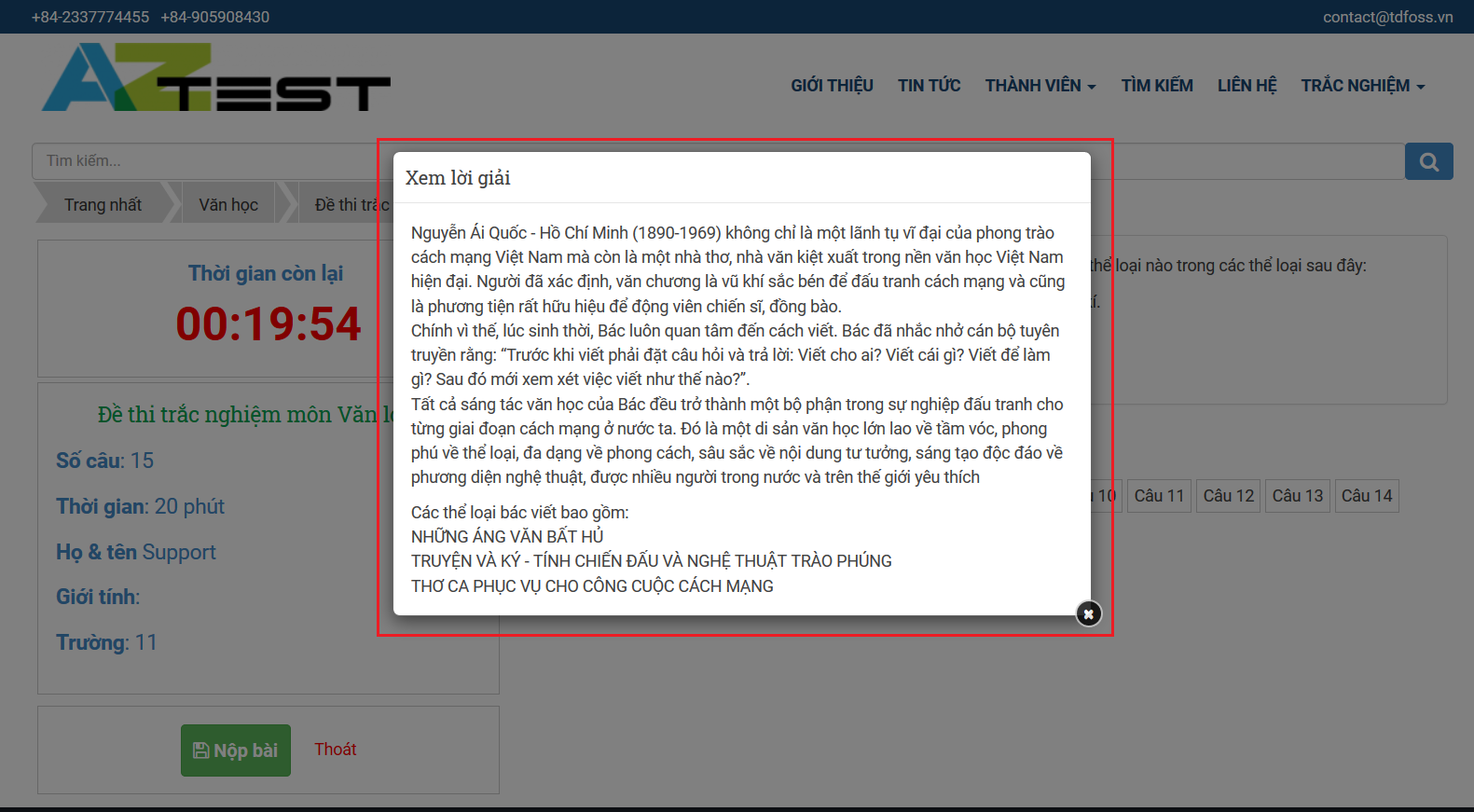
	<p dir="ltr" role="presentation" style="text-align: justify;"><span style="font-size:14px;"><span style="font-family:Arial,Helvetica,sans-serif;">Hiển thị lời giải ngay trên màn hình khi bạn chọn&nbsp;<strong>Hiển thị popup</strong>, như hình bên dưới.</span></span></p>
	</li>
</ul>

<div style="text-align:center"><img alt="" height="332" src="https://lh6.googleusercontent.com/ApqZ3UVZ7PbumjZSgMMlwDT13OHifrkrTfuNOfiiYG1TNwNXxHgINcjcCpXt1GOmFqjXwrH1FbiEEfqsKSO1dZfz7bBK92V2iTeUP7CbOVdqsZA5fosVeZaR3yrc5-18osljJHMD" width="602" /></div>

<p dir="ltr" style="text-align: justify;"><span style="font-size:14px;"><span style="font-family:Arial,Helvetica,sans-serif;">Để bật được tính năng này bạn thực hiện các bước như sau:</span></span></p>

<p dir="ltr" style="text-align: justify;"><span style="font-size:14px;"><span style="font-family:Arial,Helvetica,sans-serif;"><u><strong>Bước 1</strong></u>: Truy cập vào trang quản trị website thi trắc nghiệm của bạn&nbsp;</span></span></p>

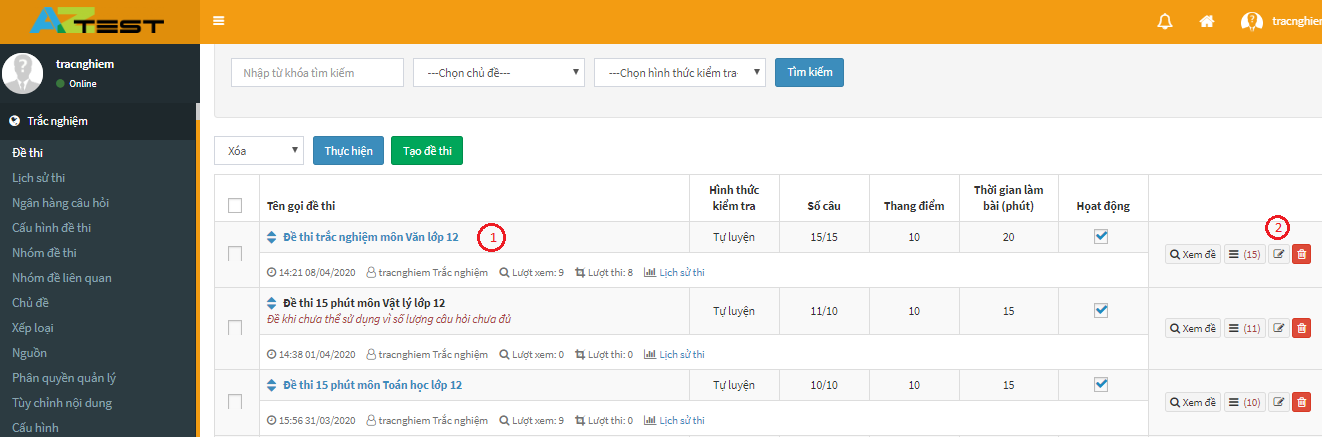
<p dir="ltr" style="text-align: justify;"><span style="font-size:14px;"><span style="font-family:Arial,Helvetica,sans-serif;"><u><strong>Bước 2</strong></u>: Trên trang hiển thị chọn&nbsp;<strong>Trắc nghiệm (1) -&gt; Đề thi (2)&nbsp;</strong></span></span></p>

<div style="text-align:center"><img alt="" height="237" src="https://lh3.googleusercontent.com/BS0pVChaGZQzuGEtbyxW0PbsMEDgD1MBS95QXc4KJClI-QbRGDvNFB46iO6xB1s8tNMaDVZhtL50PyItoH1CD1SWtwIpsDXBXJyYQP_MR1-N8EQjhQ0VTuqvkrt_o9ZsNTa5muy_" width="602" /></div>

<p dir="ltr" style="text-align: justify;"><span style="font-size:14px;"><span style="font-family:Arial,Helvetica,sans-serif;"><u><strong>Bước 3</strong></u>: Di chuyển chuột đến đề thi để chỉnh sửa tính năng hiển thị đáp án -&gt;<strong>&nbsp;Chỉnh sửa (2)</strong></span></span></p>

<div style="text-align:center"><img alt="" height="199" src="https://lh5.googleusercontent.com/WsXF2yY6yl_EKTd1KouzyPjFByrhA0VJnTg15uDG16SY7-cGPFj--PbDkcCYk4A11Qa5Qnuwmqp1FRPyNdh2gkABEr2W6PiZVwRlSq8dsXHitfD7luTEP_HD1WekaEYGcACRwGCb" width="602" /></div>

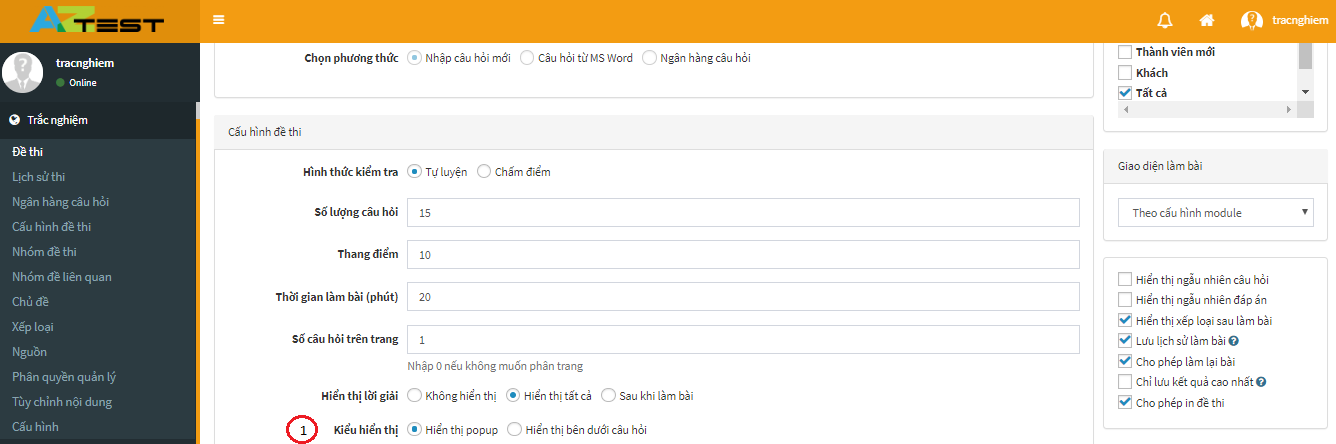
<p dir="ltr" style="text-align: justify;"><span style="font-size:14px;"><span style="font-family:Arial,Helvetica,sans-serif;"><u><strong>Bước 4</strong></u>: Kéo chuột xuống tính năng<strong>&nbsp;Kiểu hiển thị -&gt; Hiển thị popup/Hiển thị bên dưới câu hỏi (1)</strong></span></span></p>

<div style="text-align:center"><img alt="" height="200" src="https://lh5.googleusercontent.com/4aQ7FjAsYFYrL7RHlGdPw0aR14046nQeModTop9_tOPJ69a55Hwvf3q9AeYkVZTN910M4qoOmzMCC3a_MW4wX3Dq6PAHG7YCdkys3WX4ONaN2fu3p93mtdy0MhRDe6glIdGEdHT5" width="602" /></div>

<p dir="ltr" style="text-align: justify;"><span style="font-size:14px;"><span style="font-family:Arial,Helvetica,sans-serif;">Phần cuối cùng trong bước&nbsp;<strong>Thiết lập Đề thi</strong>&nbsp;là phần để bạn có thể điền thông tin&nbsp;<strong>Lời giải</strong>:</span></span></p>

<div style="text-align:center"><img alt="" height="233" src="https://lh6.googleusercontent.com/hBp_aiN8qhd-BzVBF74pKSNILcdlSqHfjZkkXwDanGT-NigcCBBAKlzxVZKo4KutI87dVV-MfVBaFaQLSNpW4KAShZSFkrEKWMjUR5x7MLQ7Yr5O18hTqjm2h41AP--cRbhI2S2O" width="602" /></div>

<ul>
	<li dir="ltr">
	<p dir="ltr" role="presentation" style="text-align: justify;"><span style="font-size:14px;"><span style="font-family:Arial,Helvetica,sans-serif;">Đối với các phân môn Tự nhiên: Sử dụng để ghi lời giải (nếu có) của câu hỏi. Người giải đề sẽ tham khảo sau khi trả lời câu hỏi để đối chiếu với bài làm.</span></span></p>
	</li>
	<li dir="ltr">
	<p dir="ltr" role="presentation" style="text-align: justify;"><span style="font-size:14px;"><span style="font-family:Arial,Helvetica,sans-serif;">Đối với các phân môn Xã hội: Sử dụng để cung cấp thêm thông tin (nếu có) liên quan đến đáp án đúng.</span></span></p>
	</li>
</ul>

<h3 dir="ltr"><strong>Quản lý đề thi</strong></h3>

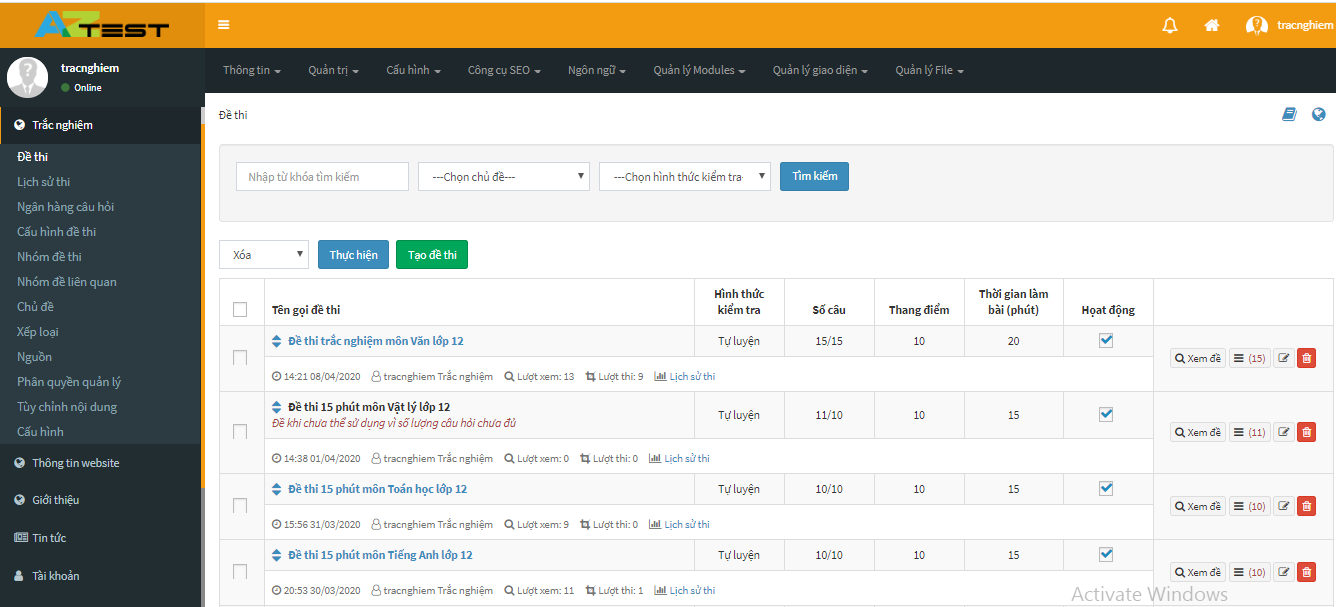
<p dir="ltr" style="text-align: justify;"><span style="font-size:14px;"><span style="font-family:Arial,Helvetica,sans-serif;">Sau khi thiết lập xong&nbsp;<strong>Đề thi</strong>, để&nbsp;<strong>Quản lý Đề thi</strong>, bạn chọn menu&nbsp;<strong>Đề thi</strong></span></span></p>

<div style="text-align:center"><img alt="" height="273" src="https://lh6.googleusercontent.com/nkpBrGM9bGqUaYplgpdTY8bvvzkUpLpGbxTVO3No95riMmjE-_SHBHE1xIRuVV0woR6n-mcISS-NBP5wsxI-JTBfhbh1dB3ERSeAyNxw_qZ9_r6v_HnTZTFKGI5SB0iOzX96RPBD" width="602" /></div>

<p dir="ltr" style="text-align: justify;"><span style="font-size:14px;"><span style="font-family:Arial,Helvetica,sans-serif;">Ở trang sẽ xuất hiện các trường thông tin đến Đề thi mà bạn vừa tạo.&nbsp;<br  />
Trên đây là các bước tạo đề thi trắc nghiệm online trên <strong><a href="https://aztest.vn/">AZtest</a></strong> mà chúng tôi muốn chia sẻ đến bạn để giúp bạn hiểu rõ hơn về cách tạo đề như thế nào? Có khó hay không. Mong rằng những chia sẻ trên sẽ giúp ích cho bạn ít nhiều trong quá trình tìm hiểu. Trong quá trình tạo đề nếu có thắc hãy liên hệ với chúng tôi theo số hotline 0233.777.4455 để được nhân viên hỗ trợ tư vấn tận tình.&nbsp;<br  />
<em><strong>&gt;&gt;&gt; XEM THÊM:&nbsp;<a href="https://aztest.vn/news/tin-tuc-thong-bao/top-4-uu-diem-tuyet-voi-tu-web-trac-nghiem-online-ma-ban-nen-biet-541.html">TOP 4 ưu điểm tuyệt vời từ web trắc nghiệm online mà bạn nên biết</a></strong></em></span></span></p>
<span style="font-size:14px;"><span style="font-family:Arial,Helvetica,sans-serif;">--------------------------------------------<br  />
AZtest là hệ thống tạo lập website thi trắc nghiệm trực tuyến do&nbsp;<strong><a href="https://tdfoss.vn/">CÔNG TY TNHH PHÁT TRIỂN VÀ DỊCH VỤ NGUỒN MỞ THUẬN ĐỨC</a>&nbsp;</strong>phát triển.&nbsp;Với AZtest, người dùng có thể dễ dàng sở hữu một website tổ chức ôn tập, thi trắc nghiệm trực tuyến hoàn toàn miễn phí, độc lập, được cá nhân hóa theo yêu cầu của người quản trị.<br  />
Liên hệ hotline&nbsp;<strong>02337774455 (Ext 3)</strong>&nbsp;hoặc Fanpage&nbsp;<a href="https://fb.me/aztest.vn"><strong>https://m.me/aztest.vn</strong></a>&nbsp;để được tư vấn trực tiếp bởi đội ngũ kỹ thuật viên của AZtest.<br  />
&gt;&gt;&gt; Nguồn:&nbsp;<a href="https://aztest.vn/news/tin-tuc-thong-bao/tao-de-thi-trac-nghiem-online-tren-aztest-kho-hay-de-546.html">https://aztest.vn/news/tin-tuc-thong-bao/tao-de-thi-trac-nghiem-online-tren-aztest-kho-hay-de-546.html</a></span></span>
		</div>
	</div>
	<div id="footer" class="clearfix">
		<div id="url">
			<strong>URL của bản tin này: </strong><a href="https://thithutructuyen.com/news/tin-tuc-giao-duc/tao-de-thi-trac-nghiem-online-tren-aztest-kho-hay-de-532.html" title="Tạo đề thi trắc nghiệm online trên AZtest khó hay dễ?">https://thithutructuyen.com/news/tin-tuc-giao-duc/tao-de-thi-trac-nghiem-online-tren-aztest-kho-hay-de-532.html</a>

		</div>
		<div class="clear"></div>
		<div class="copyright">
			&copy; Hệ thống thi trắc nghiệm trực tuyến
		</div>
		<div id="contact">
			<a href="mailto:cuccntt@moet.edu.vn">cuccntt@moet.edu.vn</a>
		</div>
	</div>
</div>
        <div id="timeoutsess" class="chromeframe">
            Bạn đã không sử dụng Site, <a onclick="timeoutsesscancel();" href="https://thithutructuyen.com/#">Bấm vào đây để duy trì trạng thái đăng nhập</a>. Thời gian chờ: <span id="secField"> 60 </span> giây
        </div>
        <div id="openidResult" class="nv-alert" style="display:none"></div>
        <div id="openidBt" data-result="" data-redirect=""></div>
<script src="https://thithutructuyen.com/assets/js/jquery/jquery.min.js"></script>
<script>var nv_base_siteurl="/",nv_lang_data="vi",nv_lang_interface="vi",nv_name_variable="nv",nv_fc_variable="op",nv_lang_variable="language",nv_module_name="news",nv_func_name="savefile",nv_is_user=0, nv_my_ofs=-4,nv_my_abbr="EDT",nv_cookie_prefix="nv4c_a9vJI",nv_check_pass_mstime=1738000,nv_area_admin=0,nv_safemode=0,theme_responsive=1,nv_is_recaptcha=0;</script>
<script src="https://thithutructuyen.com/assets/js/language/vi.js"></script>
<script src="https://thithutructuyen.com/assets/js/global.js"></script>
<script src="https://thithutructuyen.com/themes/cuccntt/js/news.js"></script>
<script src="https://thithutructuyen.com/themes/cuccntt/js/main.js"></script>
<script src="https://thithutructuyen.com/themes/cuccntt/js/bootstrap.min.js"></script>
</body>
</html>