<!DOCTYPE html>
	<html lang="vi" xmlns="http://www.w3.org/1999/xhtml" prefix="og: http://ogp.me/ns#">
	<head>
<title>Các tính năng mới được cập nhật trên phần mềm thi trắc nghiệm AZtest &#40;1&#x002F;2021&#41;</title>
<meta name="description" content="Các tính năng mới được cập nhật trên phần mềm thi trắc nghiệm AZtest &#40;1&#x002F;2021&#41; - Savefile - Tin Tức -...">
<meta name="author" content="Hệ thống thi trắc nghiệm trực tuyến">
<meta name="copyright" content="Hệ thống thi trắc nghiệm trực tuyến [cuccntt@moet.edu.vn]">
<meta name="robots" content="index, archive, follow, noodp">
<meta name="googlebot" content="index,archive,follow,noodp">
<meta name="msnbot" content="all,index,follow">
<meta name="generator" content="NukeViet v4.3">
<meta name="viewport" content="width=device-width, initial-scale=1">
<meta http-equiv="Content-Type" content="text/html; charset=utf-8">
<meta property="og:title" content="Các tính năng mới được cập nhật trên phần mềm thi trắc nghiệm AZtest &#40;1&#x002F;2021&#41;">
<meta property="og:type" content="website">
<meta property="og:description" content="Savefile - Tin Tức - https&#x3A;&#x002F;&#x002F;thithutructuyen.com&#x002F;news&#x002F;savefile&#x002F;tin-tuc-thong-bao&#x002F;cac-tinh-nang-moi-duoc-cap-nhat-tren-phan-mem-thi-trac-nghiem-aztest-2-2021-563.html">
<meta property="og:site_name" content="Hệ thống thi trắc nghiệm trực tuyến">
<meta property="og:url" content="https://thithutructuyen.com/news/tin-tuc-thong-bao/cac-tinh-nang-moi-duoc-cap-nhat-tren-phan-mem-thi-trac-nghiem-aztest-2-2021-563.html">
<link rel="shortcut icon" href="https://thithutructuyen.com/uploads/logo_116_95.jpg">
<link rel="canonical" href="https://thithutructuyen.com/news/tin-tuc-thong-bao/cac-tinh-nang-moi-duoc-cap-nhat-tren-phan-mem-thi-trac-nghiem-aztest-2-2021-563.html">
<link rel="alternate" href="https://thithutructuyen.com/news/rss/" title="Tin Tức" type="application/rss+xml">
<link rel="alternate" href="https://thithutructuyen.com/news/rss/tin-tuc-thong-bao/" title="Tin Tức - Tin tức - Thông báo" type="application/rss+xml">
<link rel="alternate" href="https://thithutructuyen.com/news/rss/tin-tuc-giao-duc/" title="Tin Tức - Tin tức giáo dục" type="application/rss+xml">
<link rel="alternate" href="https://thithutructuyen.com/news/rss/tin-tuc-doanh-nghiep/" title="Tin Tức - Tin tức doanh nghiệp" type="application/rss+xml">
<link rel="preload" as="script" href="https://thithutructuyen.com/assets/js/jquery/jquery.min.js">
<link rel="preload" as="script" href="https://thithutructuyen.com/assets/js/language/vi.js">
<link rel="preload" as="script" href="https://thithutructuyen.com/assets/js/global.js">
<link rel="preload" as="script" href="https://thithutructuyen.com/themes/cuccntt/js/news.js">
<link rel="preload" as="script" href="https://thithutructuyen.com/themes/cuccntt/js/main.js">
<link rel="preload" as="script" href="https://thithutructuyen.com/themes/cuccntt/js/bootstrap.min.js">
<link rel="StyleSheet" href="https://thithutructuyen.com/assets/css/font-awesome.min.css">
<link rel="StyleSheet" href="https://thithutructuyen.com/themes/cuccntt/css/bootstrap.min.css">
<link rel="StyleSheet" href="https://thithutructuyen.com/themes/cuccntt/css/style.css">
<link rel="StyleSheet" href="https://thithutructuyen.com/themes/cuccntt/css/style.responsive.css">
<link rel="StyleSheet" href="https://thithutructuyen.com/themes/cuccntt/css/news.css">
<link rel="StyleSheet" href="https://thithutructuyen.com/assets/css/cuccntt.vi.0.css?t=1637722611">
<style>
	body{background: #fff;}
</style>
<script data-show="inline">(function(i,s,o,g,r,a,m){i['GoogleAnalyticsObject']=r;i[r]=i[r]||function(){
(i[r].q=i[r].q||[]).push(arguments)},i[r].l=1*new Date();a=s.createElement(o),
m=s.getElementsByTagName(o)[0];a.async=1;a.src=g;m.parentNode.insertBefore(a,m)
})(window,document,'script','https://www.google-analytics.com/analytics.js','ga');
ga('create', 'UA-209981721-2', '.thithutructuyen.com');
ga('send', 'pageview');
</script>
</head>
	<body>
<div id="print">
	<div id="hd_print">
		<h2 class="pull-left">Hệ thống thi trắc nghiệm trực tuyến</h2>
		<p class="pull-right"><a title="Hệ thống thi trắc nghiệm trực tuyến" href="https://thithutructuyen.com/">https://thithutructuyen.com</a></p>
	</div>
	<div class="clear"></div>
	<hr />
	<div id="content">
		<h1>Các tính năng mới được cập nhật trên phần mềm thi trắc nghiệm AZtest &#40;1&#x002F;2021&#41;</h1>
		<ul class="list-inline">
			<li>Thứ sáu - 05/02/2021 02:46</li>
			<li class="hidden-print txtrequired"><em class="fa fa-print">&nbsp;</em><a title="In ra" href="javascript:;" onclick="window.print()">In ra</a></li>
			<li class="hidden-print txtrequired"><em class="fa fa-power-off">&nbsp;</em><a title="Đóng cửa sổ này" href="javascript:;" onclick="window.close()">Đóng cửa sổ này</a></li>
		</ul>
		<div class="clear"></div>
		<div id="hometext">
			Để đáp ứng nhu cầu sử dụng của quý khách hàng, AZtest đã và đang không ngừng đưa ra những tính năng mới giúp người dùng có được trải nghiệm tuyệt vời trên hệ thống thi trắc nghiệm của chúng tôi. Bài viết hôm nay AZtest sẽ cập nhật đến người dùng một số tính năng mới mà chúng tôi đã thêm vào phần mềm nhằm hỗ trợ quá trình sử dụng của người dùng trên hệ thống được tốt hơn.
		</div>
				<div class="imghome">
			<img alt="Các tính năng mới được cập nhật trên phần mềm thi trắc nghiệm AZtest &#40;2&#x002F;2021&#41;" src="https://thithutructuyen.com/uploads/news/2021_02/aztest.jpg" width="460" class="img-thumbnail" />
		</div>
		<div class="clear"></div>
		<div id="bodytext" class="clearfix">
			<h2><strong>1. Tính năng công khai/không công khai điểm sau khi thi</strong></h2>

<div style="text-align: justify;"><span style="font-size:14px;"><span style="font-family:Arial,Helvetica,sans-serif;">Để sử dụng tính năng hiển thị điểm sau khi thi bạn cần thực hiện các bước sau:</span></span></div>

<ul>
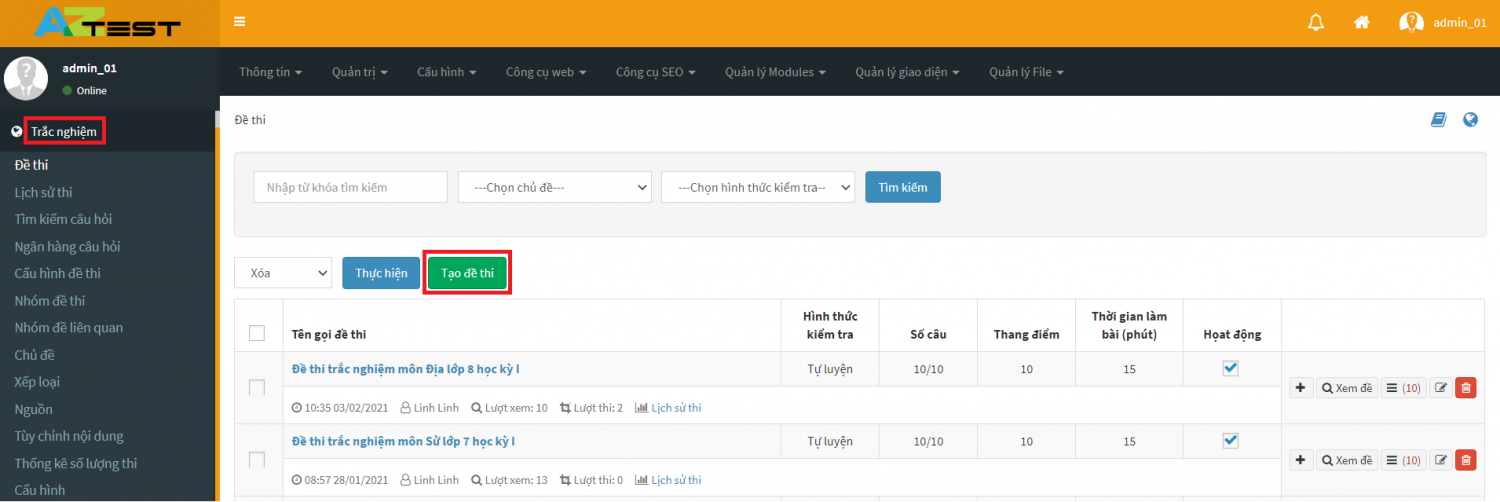
	<li style="text-align: justify;"><span style="font-size:14px;"><span style="font-family:Arial,Helvetica,sans-serif;"><u><strong>Bước 1</strong></u>: Đăng nhập vào trang quản trị -&gt;&nbsp;<strong>Trắc nghiệm&nbsp;</strong></span></span></li>
	<li style="text-align: justify;"><span style="font-size:14px;"><span style="font-family:Arial,Helvetica,sans-serif;"><u><strong>Bước 2</strong></u>: Chọn&nbsp;<strong>Tạo đề thi trắc nghiệm</strong>&nbsp;và điền các thông tin để tạo bộ đề thi hoàn chỉnh.</span></span></li>
</ul>

<div style="text-align: justify;">
<div style="text-align:center">
<figure class="image" style="display:inline-block"><img alt="buoc 1 2" height="257" src="https://aztest.vn/uploads/news/2021/buoc-1-2.png" width="772" />
<figcaption><em>Hình 1. Tạo đề thi trắc nghiệm&nbsp;</em></figcaption>
</figure>
</div>
</div>

<ul>
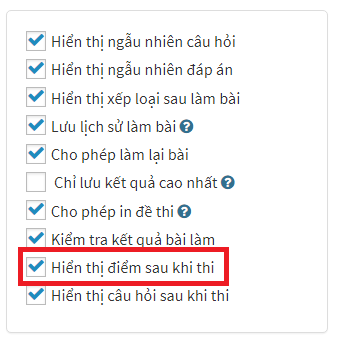
	<li style="text-align: justify;"><span style="font-size:14px;"><span style="font-family:Arial,Helvetica,sans-serif;"><u><strong>Bước 3</strong></u>: Tích chọn&nbsp;<strong>Hiển thị đề thi sau khi thi</strong>&nbsp;hoặc không theo mong muốn -&gt;&nbsp;<strong>Cập nhật.</strong></span></span></li>
</ul>

<div style="text-align: justify;">
<div style="text-align:center">
<figure class="image" style="display:inline-block"><img alt="chọn hiển thị hoặc không hiển thị" height="350" src="https://aztest.vn/uploads/news/2021/chon-hien-thi-hoac-khong-hien-thi_1.png" width="345" />
<figcaption><em>Hình 2. Chọn tính năng hiển thị/không hiển thị điểm sau khi thi</em></figcaption>
</figure>
</div>
</div>

<div style="text-align: justify;"><br  />
<span style="font-size:14px;"><span style="font-family:Arial,Helvetica,sans-serif;">Với tính năng này AZtest đã tạo một checkbox hiển thị điểm sau khi thi cho phép người quản trị click chọn hiển thị/không hiển thị điểm của người thi sau khi làm xong bài thi.&nbsp;</span></span></div>

<ul>
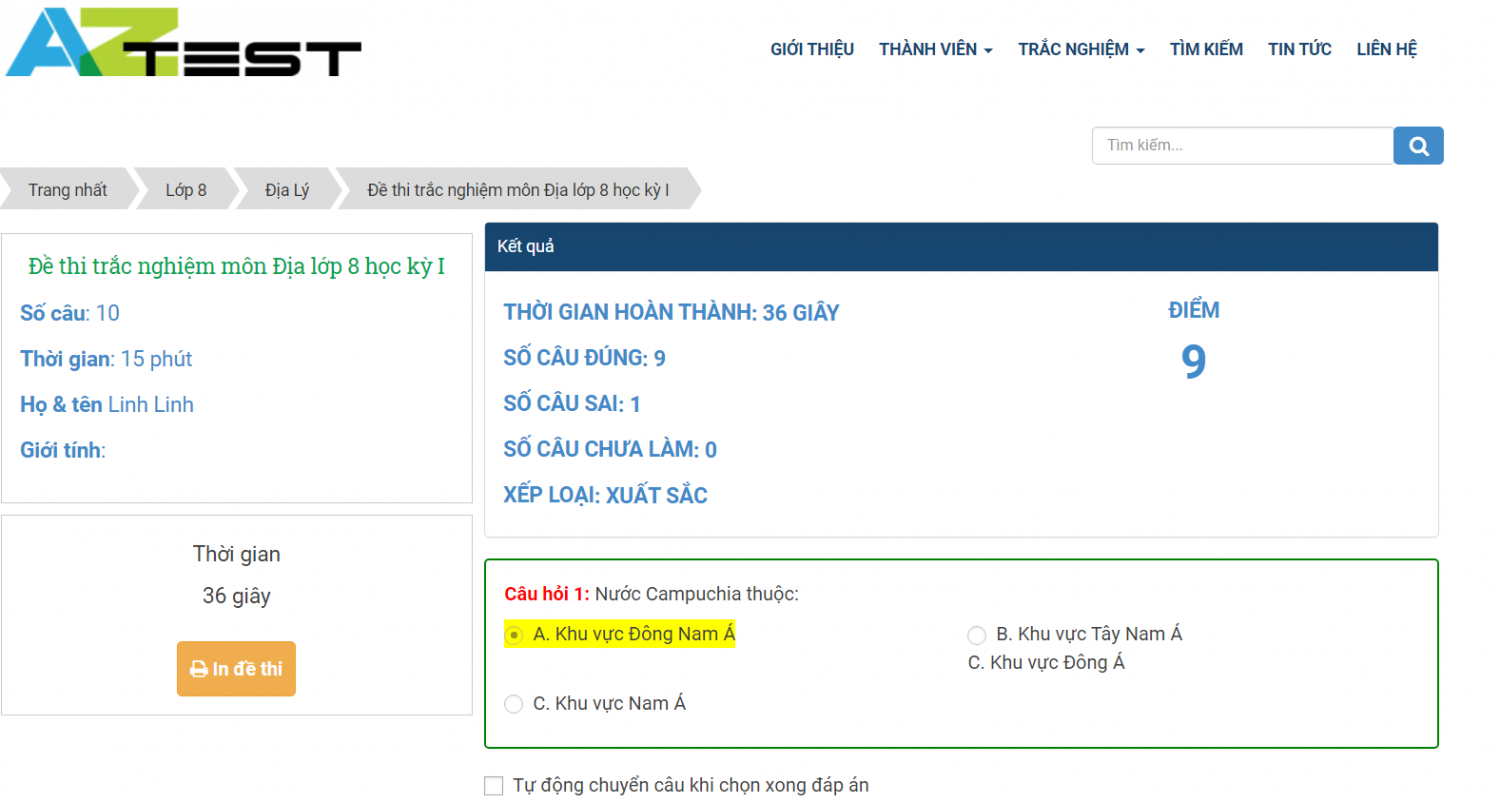
	<li style="text-align: justify;"><span style="font-size:14px;"><span style="font-family:Arial,Helvetica,sans-serif;">Nếu chọn hiển thị điểm sau khi thi sau khi kết thúc làm bài người thi sẽ nhận được kết quả như hình bên dưới.&nbsp;</span></span></li>
</ul>

<div style="text-align: justify;">
<div style="text-align:center">
<figure class="image" style="display:inline-block"><img alt="hình 1" height="412" src="https://aztest.vn/uploads/news/2021/hinh-1.png" width="772" />
<figcaption><em>Hình 3. Khi tích chọn checkbox hiển thị điểm sau khi thi</em></figcaption>
</figure>
</div>
</div>

<ul>
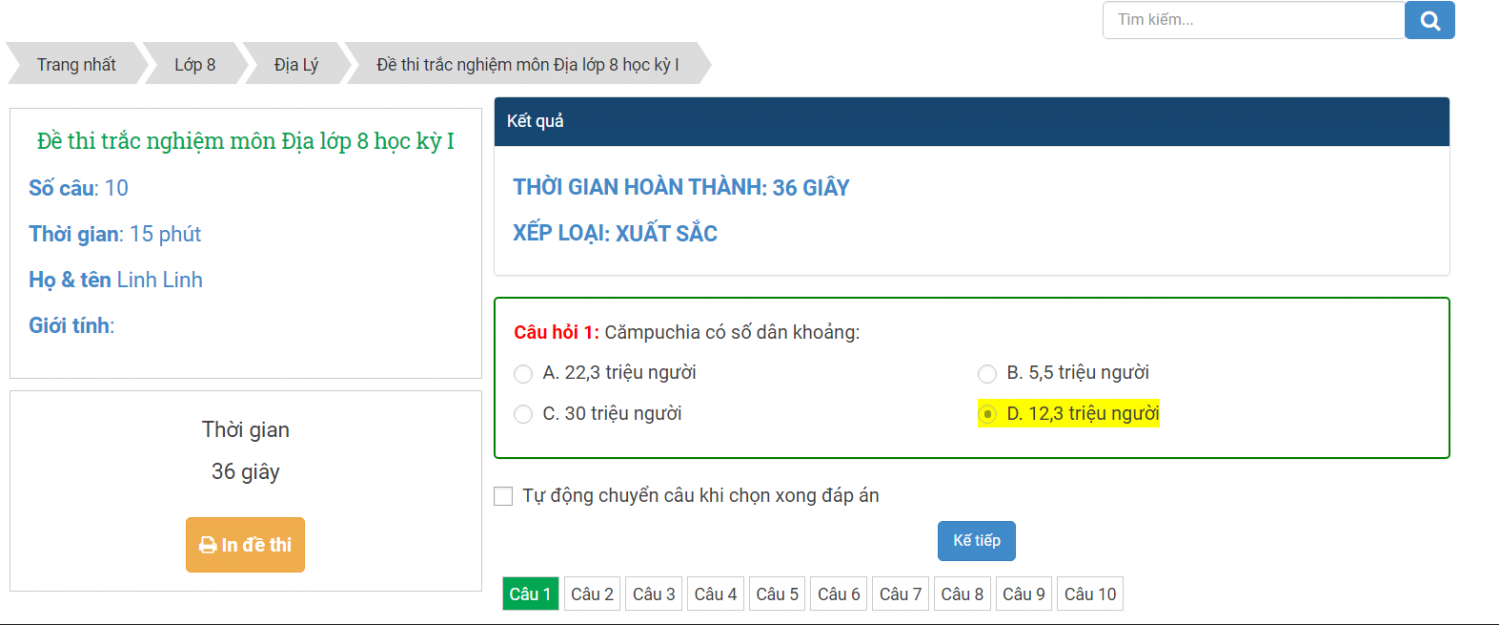
	<li style="text-align: justify;"><span style="font-size:14px;"><span style="font-family:Arial,Helvetica,sans-serif;">&nbsp;Nếu không chọn checkbox hiển thi điểm sau thi thì kết quả sau khi thi sẽ không có điểm số sau khi kết thúc bài thi.</span></span></li>
</ul>

<div style="text-align: justify;">
<div style="text-align:center">
<figure class="image" style="display:inline-block"><img alt="hinh 2" height="320" src="https://aztest.vn/uploads/news/2021/hinh-2.png" width="772" />
<figcaption><em>Hình 4. Khi không chọn checkbox sau khi kết thúc bài thi</em></figcaption>
</figure>
</div>
</div>

<h2><strong>2. Tính năng hiển thị câu hỏi sau khi thi&nbsp;</strong></h2>

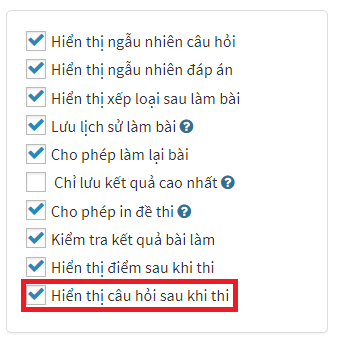
<div style="text-align: justify;"><span style="font-size:14px;"><span style="font-family:Arial,Helvetica,sans-serif;">Tính năng hiển thị câu hỏi sau khi thi cho phép người quản trị có thể hiển thị hoặc không hiển thị nội dung câu hỏi sau khi bài thi kết thúc, các bước thực hiện như chức năng hiển thị điểm sau khi thi. Chỉ khác là chỗ checkbox bạn tích chọn Hiển thị câu hỏi sau khi thi như hình bên dưới.&nbsp;</span></span>

<div style="text-align:center">
<figure class="image" style="display:inline-block"><img alt="hien thi cau hoi" height="350" src="https://aztest.vn/uploads/news/2021/hien-thi-cau-hoi.png" width="345" />
<figcaption><em>Hình 5. Chọn tính năng hiển thị câu hỏi sau khi thi</em></figcaption>
</figure>
</div>
</div>

<h2><strong>3. Tính năng hiển thị câu hỏi đúng sai</strong></h2>

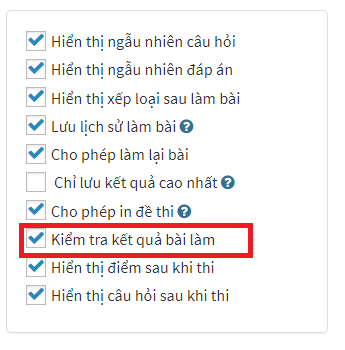
<p dir="ltr" style="text-align: justify;"><span style="font-size:14px;"><span style="font-family:Arial,Helvetica,sans-serif;">Tính năng này hỗ trợ người người quản trị&nbsp;có thể bật hoặc tắt hiển thị câu hỏi&nbsp;đúng sai sau khi kết thúc làm bài. Các bước thực hiện tương tự như các tính năng trên. Tuy nhiên khi chọn checkbox bạn chọn &quot;Kiểm tra kết quả bài làm&quot; như hình bên dưới.</span></span></p>

<div style="text-align:center">
<figure class="image" style="display:inline-block"><img alt="kiem tra ket qua bai lam" height="350" src="https://aztest.vn/uploads/news/2021/kiem-tra-ket-qua-bai-lam.png" width="345" />
<figcaption><em>Hình 6. Kiểm tra kết quả bài làm</em></figcaption>
</figure>
</div>

<p dir="ltr" style="text-align: justify;"><br  />
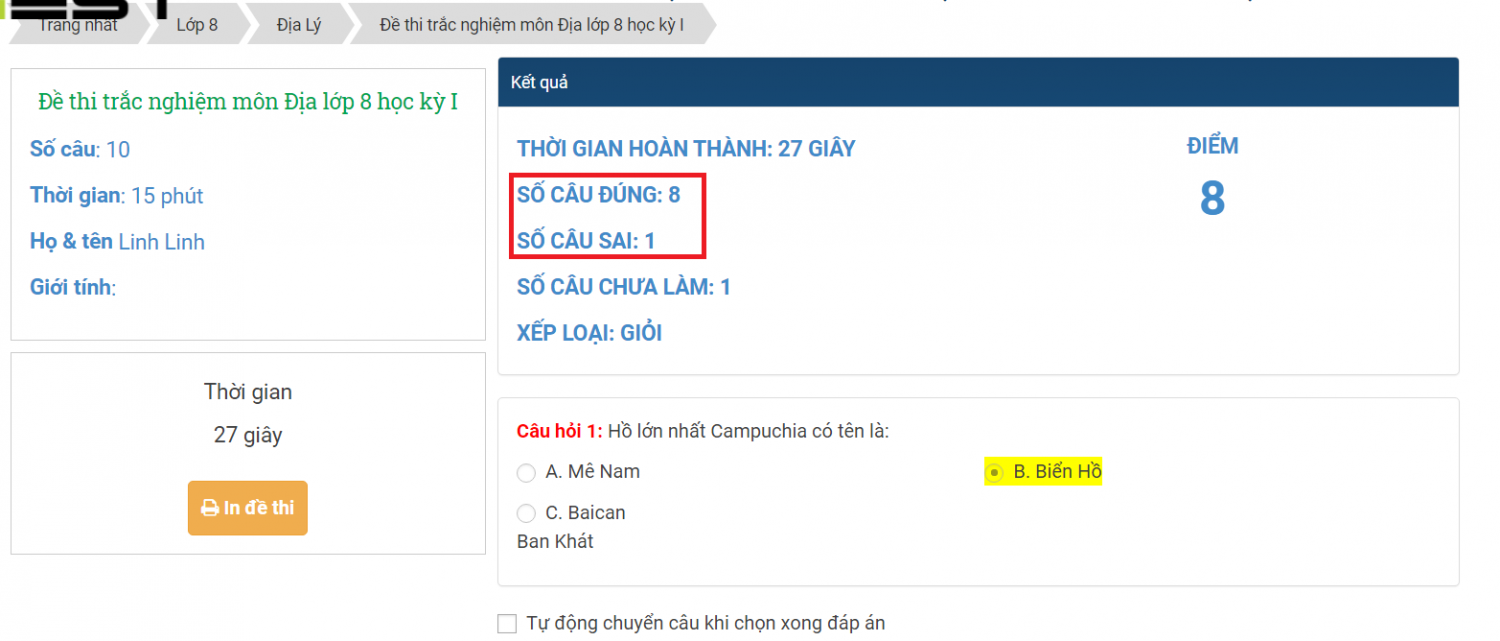
<span style="font-size:14px;"><span style="font-family:Arial,Helvetica,sans-serif;">Nếu tích chọn checkbox&nbsp;<strong>Kiểm tra kết quả bài làm&nbsp;</strong>thì sau khi kết thúc bài thi hệ thống sẽ hiển thị số câu hỏi đúng, số câu hỏi sai như hình bên dưới. Còn nếu không tích chọn thì ngược lại.</span></span></p>

<div style="text-align:center">
<figure class="image" style="display:inline-block"><img alt="kiem tra kq" height="329" src="https://aztest.vn/uploads/news/2021/kiem-tra-kq.png" width="772" />
<figcaption><em>Hình 7. Tính năng kiểm tra kết quả bài làm&nbsp;</em></figcaption>
</figure>
</div>

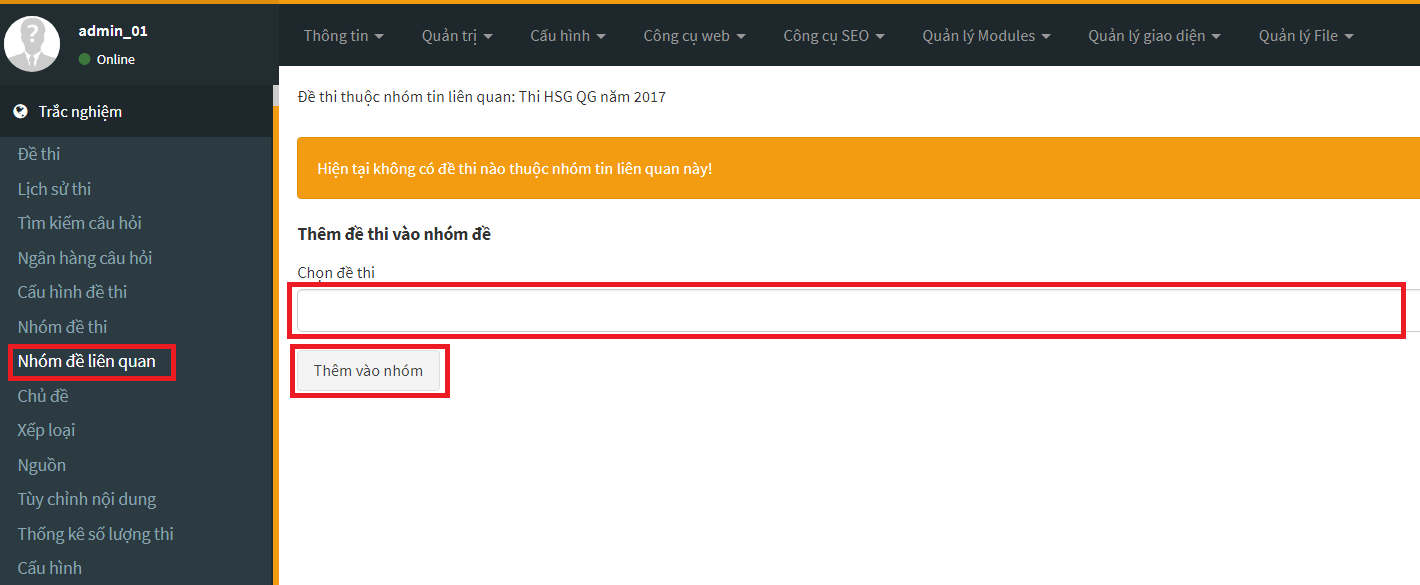
<h2 dir="ltr"><strong>4. Thêm nhóm đề thi vào nhóm đề liên quan&nbsp;</strong></h2>

<div style="text-align: justify;"><span style="font-size:14px;"><span style="font-family:Arial,Helvetica,sans-serif;">Tính năng mới này cho phép người dùng có thể dễ dàng thêm đề thi ở mục quẩn lý nhóm đề liên quan mà không cần mất nhiều thời gian để quay lại sau đó mới thực hiện thao tác thêm/sửa đề thi như trước đây. Để sử dụng tính năng này bạn thực hiện các bước như sau:</span></span></div>

<ul dir="ltr">
	<li style="text-align: justify;"><span style="font-size:14px;"><span style="font-family:Arial,Helvetica,sans-serif;"><u><strong>Bước 1</strong></u>: Đăng nhập vào trang quản trị</span></span></li>
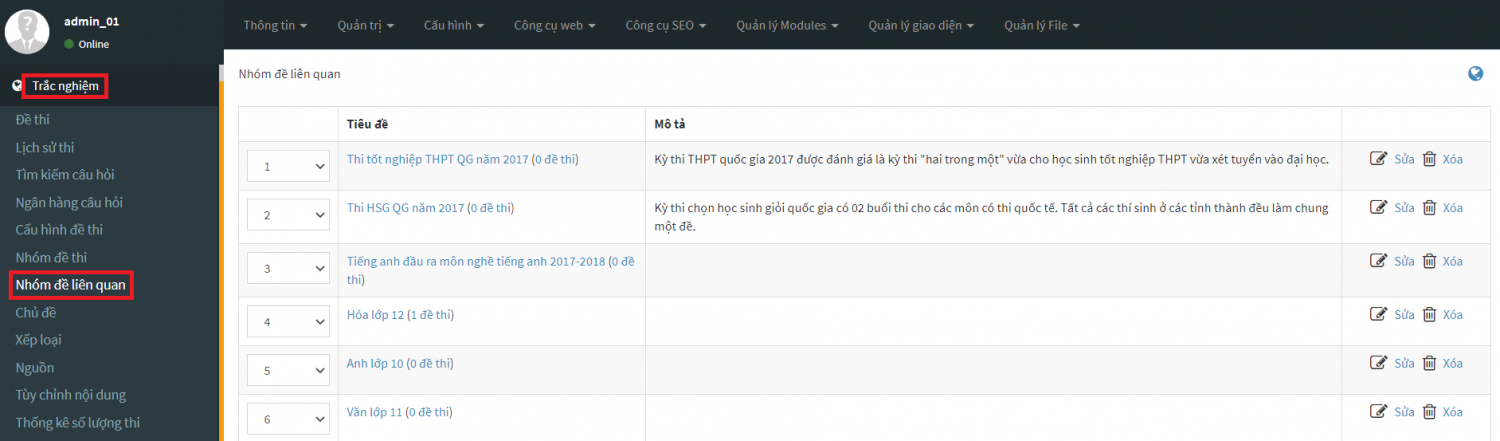
	<li style="text-align: justify;"><span style="font-size:14px;"><span style="font-family:Arial,Helvetica,sans-serif;"><u><strong>Bước 2</strong></u>: Chọn&nbsp;<strong>Trắc nghiệm</strong>&nbsp;-&gt;&nbsp;<strong>Nhóm đề thi liên quan</strong></span></span></li>
</ul>

<div style="text-align: justify;">
<div style="text-align:center">
<figure class="image" style="display:inline-block"><img alt="buoc 1 1" height="225" src="https://aztest.vn/uploads/news/2021/buoc-1-1.png" width="772" />
<figcaption><em>Hình 8. Truy cập để tạo nhóm đề thi liên quan&nbsp;</em></figcaption>
</figure>
</div>
</div>

<figcaption>&nbsp;</figcaption>

<ul>
	<li style="text-align: justify;"><span style="font-size:14px;"><span style="font-family:Arial,Helvetica,sans-serif;"><u><strong>Bước 3</strong></u>: Sau khi chọn&nbsp;<strong>Nhóm đề liên quan</strong>&nbsp;hình ảnh sẽ xuất hiện như bên dưới. Vào mục tìm kiếm đề thi bạn cần thêm vào sau đó nhấn Thêm vào nhóm.&nbsp;</span></span></li>
</ul>

<div style="text-align: justify;">
<div style="text-align:center">
<figure class="image" style="display:inline-block"><img alt="buoc 1 2" height="317" src="https://aztest.vn/uploads/news/2021/buoc-1-2_1.png" width="772" />
<figcaption><em>Hình 10. Chọn nhóm đề thi cần thêm vào nhóm</em></figcaption>
</figure>
</div>
</div>

<div style="text-align: justify;"><span style="font-size:14px;"><span style="font-family:Arial,Helvetica,sans-serif;">Trên đây là 4 tính năng mới nhất mà AZtest đã hoàn thiện giúp cho người dùng có được những trải nghiệm tuyệt vời trong quá trình sử dụng phần mềm thi trắc nghiệm online AZtest. Nếu gặp khó khăn hay thắc mắc trong quá trình sử dụng hãy liên hệ với AZtest theo số hotline&nbsp;<strong>0233 777 4455</strong>&nbsp;(Nhánh 3) để được nhân viên tư vấn, hỗ trợ nhanh chóng.&nbsp;<br  />
--------------------------------------------<br  />
AZtest là hệ thống tạo lập website thi trắc nghiệm trực tuyến do&nbsp;<strong><a href="https://tdfoss.vn/">CÔNG TY TNHH PHÁT TRIỂN VÀ DỊCH VỤ NGUỒN MỞ THUẬN ĐỨC</a>&nbsp;</strong>phát triển.&nbsp;Với AZtest, người dùng có thể dễ dàng sở hữu một website tổ chức ôn tập, thi trắc nghiệm trực tuyến hoàn toàn miễn phí, độc lập, được cá nhân hóa theo yêu cầu của người quản trị.<br  />
Liên hệ hotline&nbsp;<strong>02337774455 (Ext 3)</strong>&nbsp;hoặc Fanpage&nbsp;<a href="https://fb.me/aztest.vn"><strong>https://m.me/aztest.vn</strong></a>&nbsp;để được tư vấn trực tiếp bởi đội ngũ kỹ thuật viên của AZtest.<br  />
<em><strong>&gt;&gt;&gt; Nguồn:&nbsp;<a href="https://aztest.vn/news/tin-tuc-thong-bao/aztest-he-thong-thi-trac-nghiem-truc-tuyen-hieu-qua-nhat-hien-nay-656.html">https://aztest.vn/news/tin-tuc-thong-bao/aztest-he-thong-thi-trac-nghiem-truc-tuyen-hieu-qua-nhat-hien-nay-656.html</a></strong></em></span></span></div>
		</div>
	</div>
	<div id="footer" class="clearfix">
		<div id="url">
			<strong>URL của bản tin này: </strong><a href="https://thithutructuyen.com/news/tin-tuc-thong-bao/cac-tinh-nang-moi-duoc-cap-nhat-tren-phan-mem-thi-trac-nghiem-aztest-2-2021-563.html" title="Các tính năng mới được cập nhật trên phần mềm thi trắc nghiệm AZtest &#40;1&#x002F;2021&#41;">https://thithutructuyen.com/news/tin-tuc-thong-bao/cac-tinh-nang-moi-duoc-cap-nhat-tren-phan-mem-thi-trac-nghiem-aztest-2-2021-563.html</a>

		</div>
		<div class="clear"></div>
		<div class="copyright">
			&copy; Hệ thống thi trắc nghiệm trực tuyến
		</div>
		<div id="contact">
			<a href="mailto:cuccntt@moet.edu.vn">cuccntt@moet.edu.vn</a>
		</div>
	</div>
</div>
        <div id="timeoutsess" class="chromeframe">
            Bạn đã không sử dụng Site, <a onclick="timeoutsesscancel();" href="https://thithutructuyen.com/#">Bấm vào đây để duy trì trạng thái đăng nhập</a>. Thời gian chờ: <span id="secField"> 60 </span> giây
        </div>
        <div id="openidResult" class="nv-alert" style="display:none"></div>
        <div id="openidBt" data-result="" data-redirect=""></div>
<div id="run_cronjobs" style="visibility:hidden;display:none;"><img alt="" src="/index.php?second=cronjobs&amp;p=e0lyXv7O" width="1" height="1" /></div>
<script src="https://thithutructuyen.com/assets/js/jquery/jquery.min.js"></script>
<script>var nv_base_siteurl="/",nv_lang_data="vi",nv_lang_interface="vi",nv_name_variable="nv",nv_fc_variable="op",nv_lang_variable="language",nv_module_name="news",nv_func_name="savefile",nv_is_user=0, nv_my_ofs=-4,nv_my_abbr="EDT",nv_cookie_prefix="nv4c_a9vJI",nv_check_pass_mstime=1738000,nv_area_admin=0,nv_safemode=0,theme_responsive=1,nv_is_recaptcha=0;</script>
<script src="https://thithutructuyen.com/assets/js/language/vi.js"></script>
<script src="https://thithutructuyen.com/assets/js/global.js"></script>
<script src="https://thithutructuyen.com/themes/cuccntt/js/news.js"></script>
<script src="https://thithutructuyen.com/themes/cuccntt/js/main.js"></script>
<script src="https://thithutructuyen.com/themes/cuccntt/js/bootstrap.min.js"></script>
</body>
</html>