<!DOCTYPE html>
	<html lang="vi" xmlns="http://www.w3.org/1999/xhtml" prefix="og: http://ogp.me/ns#">
	<head>
<title>Hướng dẫn cách nhập câu hỏi từ Microsoft Word</title>
<meta name="description" content="Hướng dẫn cách nhập câu hỏi từ Microsoft Word - Savefile - Tin Tức -...">
<meta name="author" content="Hệ thống thi trắc nghiệm trực tuyến">
<meta name="copyright" content="Hệ thống thi trắc nghiệm trực tuyến [cuccntt@moet.edu.vn]">
<meta name="robots" content="index, archive, follow, noodp">
<meta name="googlebot" content="index,archive,follow,noodp">
<meta name="msnbot" content="all,index,follow">
<meta name="generator" content="NukeViet v4.3">
<meta name="viewport" content="width=device-width, initial-scale=1">
<meta http-equiv="Content-Type" content="text/html; charset=utf-8">
<meta property="og:title" content="Hướng dẫn cách nhập câu hỏi từ Microsoft Word">
<meta property="og:type" content="website">
<meta property="og:description" content="Savefile - Tin Tức - https&#x3A;&#x002F;&#x002F;thithutructuyen.com&#x002F;news&#x002F;savefile&#x002F;tin-tuc-thong-bao&#x002F;huong-dan-cach-nhap-cau-hoi-tu-microsoft-word-579.html">
<meta property="og:site_name" content="Hệ thống thi trắc nghiệm trực tuyến">
<meta property="og:url" content="https://thithutructuyen.com/news/tin-tuc-thong-bao/huong-dan-cach-nhap-cau-hoi-tu-microsoft-word-579.html">
<link rel="shortcut icon" href="https://thithutructuyen.com/uploads/logo_116_95.jpg">
<link rel="canonical" href="https://thithutructuyen.com/news/tin-tuc-thong-bao/huong-dan-cach-nhap-cau-hoi-tu-microsoft-word-579.html">
<link rel="alternate" href="https://thithutructuyen.com/news/rss/" title="Tin Tức" type="application/rss+xml">
<link rel="alternate" href="https://thithutructuyen.com/news/rss/tin-tuc-thong-bao/" title="Tin Tức - Tin tức - Thông báo" type="application/rss+xml">
<link rel="alternate" href="https://thithutructuyen.com/news/rss/tin-tuc-giao-duc/" title="Tin Tức - Tin tức giáo dục" type="application/rss+xml">
<link rel="alternate" href="https://thithutructuyen.com/news/rss/tin-tuc-doanh-nghiep/" title="Tin Tức - Tin tức doanh nghiệp" type="application/rss+xml">
<link rel="preload" as="script" href="https://thithutructuyen.com/assets/js/jquery/jquery.min.js">
<link rel="preload" as="script" href="https://thithutructuyen.com/assets/js/language/vi.js">
<link rel="preload" as="script" href="https://thithutructuyen.com/assets/js/global.js">
<link rel="preload" as="script" href="https://thithutructuyen.com/themes/cuccntt/js/news.js">
<link rel="preload" as="script" href="https://thithutructuyen.com/themes/cuccntt/js/main.js">
<link rel="preload" as="script" href="https://thithutructuyen.com/themes/cuccntt/js/bootstrap.min.js">
<link rel="StyleSheet" href="https://thithutructuyen.com/assets/css/font-awesome.min.css">
<link rel="StyleSheet" href="https://thithutructuyen.com/themes/cuccntt/css/bootstrap.min.css">
<link rel="StyleSheet" href="https://thithutructuyen.com/themes/cuccntt/css/style.css">
<link rel="StyleSheet" href="https://thithutructuyen.com/themes/cuccntt/css/style.responsive.css">
<link rel="StyleSheet" href="https://thithutructuyen.com/themes/cuccntt/css/news.css">
<link rel="StyleSheet" href="https://thithutructuyen.com/assets/css/cuccntt.vi.0.css?t=1637722611">
<style>
	body{background: #fff;}
</style>
<script data-show="inline">(function(i,s,o,g,r,a,m){i['GoogleAnalyticsObject']=r;i[r]=i[r]||function(){
(i[r].q=i[r].q||[]).push(arguments)},i[r].l=1*new Date();a=s.createElement(o),
m=s.getElementsByTagName(o)[0];a.async=1;a.src=g;m.parentNode.insertBefore(a,m)
})(window,document,'script','https://www.google-analytics.com/analytics.js','ga');
ga('create', 'UA-209981721-2', '.thithutructuyen.com');
ga('send', 'pageview');
</script>
</head>
	<body>
<div id="print">
	<div id="hd_print">
		<h2 class="pull-left">Hệ thống thi trắc nghiệm trực tuyến</h2>
		<p class="pull-right"><a title="Hệ thống thi trắc nghiệm trực tuyến" href="https://thithutructuyen.com/">https://thithutructuyen.com</a></p>
	</div>
	<div class="clear"></div>
	<hr />
	<div id="content">
		<h1>Hướng dẫn cách nhập câu hỏi từ Microsoft Word</h1>
		<ul class="list-inline">
			<li>Thứ hai - 07/06/2021 03:34</li>
			<li class="hidden-print txtrequired"><em class="fa fa-print">&nbsp;</em><a title="In ra" href="javascript:;" onclick="window.print()">In ra</a></li>
			<li class="hidden-print txtrequired"><em class="fa fa-power-off">&nbsp;</em><a title="Đóng cửa sổ này" href="javascript:;" onclick="window.close()">Đóng cửa sổ này</a></li>
		</ul>
		<div class="clear"></div>
		<div id="hometext">
			Một trong số những tính năng hữu ích AZtest cung cấp cho người dùng trong quá trình sử dụng chính là tính năng nhập câu hỏi từ Microsoft Word. Với các bước thực hiện vô cùng đơn giản và dễ dàng. Vậy cách nhập câu hỏi từ Microsoft Word lên website thi trắc nghiệm được thực hiện như thế nào? Theo dõi ngay bài viết sau đây để trả lời thắc mắc của mình nhé.
		</div>
				<div class="imghome">
			<img alt="Hướng dẫn cách nhập câu hỏi từ Microsoft Word" src="https://thithutructuyen.com/uploads/news/2021_06/huong-dan-de-thi-tu-file-word.jpg" width="460" class="img-thumbnail" />
		</div>
		<div class="clear"></div>
		<div id="bodytext" class="clearfix">
			<h2 id="1-kiem-tra-va-thay-oi-noi-dung-e-thi" style="text-align: justify;"><strong>1. Kiểm tra và thay đổi nội dung đề thi</strong></h2>

<p style="text-align: justify;"><span style="font-size:14px;"><span style="font-family:Arial,Helvetica,sans-serif;">Đối với mỗi câu hỏi bạn thực hiện lần lượt các thao tác sau:</span></span></p>

<ul>
	<li style="text-align: justify;"><span style="font-size:14px;"><span style="font-family:Arial,Helvetica,sans-serif;">Định dạng file cho phép:&nbsp;.docx</span></span></li>
	<li style="text-align: justify;"><span style="font-size:14px;"><span style="font-family:Arial,Helvetica,sans-serif;">Tập tin MS Word chỉ chứa nội dung câu hỏi, câu trả lời. Các nội dung không liên quan ở trên và dưới phần nội dung câu hỏi, câu trả lời cần được xóa bỏ</span></span></li>
	<li style="text-align: justify;"><span style="font-size:14px;"><span style="font-family:Arial,Helvetica,sans-serif;">Mỗi câu hỏi, đáp án nằm trên một hàng riêng biệt</span></span></li>
	<li style="text-align: justify;"><span style="font-size:14px;"><span style="font-family:Arial,Helvetica,sans-serif;">Không cần đánh thứ tự số câu. Ví dụ: Câu 1, Câu 2,...... Nếu có, hãy xóa nó đi (Hệ thống sẽ tự đánh khi thể hiện đề thi)</span></span></li>
	<li style="text-align: justify;"><span style="font-size:14px;"><span style="font-family:Arial,Helvetica,sans-serif;">Không cần đánh thứ tự đán án. Ví dụ: A, B, C, D,..... Nếu có, hãy xóa nó đi (Hệ thống sẽ tự đánh khi thể hiện đề thi)</span></span></li>
	<li style="text-align: justify;"><span style="font-size:14px;"><span style="font-family:Arial,Helvetica,sans-serif;">Đánh dấu đáp án đúng bằng dấu&nbsp;sao&nbsp;(*), đằng trước đáp án đúng. Bạn có thể nhiều dấu sao để chỉ định nhiều đáp án đúng</span></span></li>
	<li style="text-align: justify;"><span style="font-size:14px;"><span style="font-family:Arial,Helvetica,sans-serif;">Nội dung lời giải đặt bên dưới đáp án cuối cùng, mở đầu bằng một dấu&nbsp;lớn&nbsp;(&gt;)</span></span></li>
	<li style="text-align: justify;"><span style="font-size:14px;"><span style="font-family:Arial,Helvetica,sans-serif;">Mỗi bộ câu hỏi (gồm câu hỏi và đáp án) cách nhau bởi một dòng trắng (Một dấu enter)</span></span></li>
	<li style="text-align: justify;"><span style="font-size:14px;"><span style="font-family:Arial,Helvetica,sans-serif;">Font chữ, kích cỡ chữ trên file sẽ được tự động loại bỏ để có định dạng giống với giao diện website. Vậy nên, khi biên soạn đề bạn không cần phải lưu tâm tới việc định dạng font chữ và cỡ chữ</span></span></li>
</ul>

<p style="text-align: justify;"><span style="font-size:14px;"><span style="font-family:Arial,Helvetica,sans-serif;">Xem ví dụ:</span></span></p>

<pre>
<code>Một người gửi tiết kiệm vào một ngân hàng với lãi suất  $7,2%$ năm. 
Biết rằng nếu không rút tiền ra khỏi ngân hàng thì cứ sau mỗi năm số tiền lãi sẽ được nhập vào vốn để tính lãi cho năm tiếp theo. 
Hỏi sau ít nhất bao nhiêu năm người đo thu được (cả số tiền gửi ban đầu và lãi) gấp đôi số tiền gửi ban đầu, 
giả định trong khoảng thời gian này lãi suất không thay đổi và người đó không rút tiền ra??   
&gt;10 năm
11 năm
12 năm
9 năm
*10 năm
13 năm

</code></pre>

<p style="text-align: justify;"><span style="font-size:14px;"><span style="font-family:Arial,Helvetica,sans-serif;">Tải file mẫu:&nbsp;&nbsp;&nbsp;<a href="https://docs.aztest.vn/images/test/template_import.docx">template_import.docx</a></span></span></p>

<h2 dir="ltr" style="text-align: justify;"><strong>2. Đối với đề thi có chứa công thức toán học</strong></h2>

<p dir="ltr" style="text-align: justify;"><span style="font-size:14px;"><span style="font-family:Arial,Helvetica,sans-serif;">Để tải đề thi có chứa công thức Toán học lên hệ thống, bạn cần phải qua một số thao tác kỹ thuật nhằm chuyển công thức Toán sang dạng ký hiệu. Hướng dẫn dưới đây sẽ giúp bạn làm điều này.</span></span></p>

<h3 dir="ltr" style="text-align: justify;"><strong>Tiến hành cài đặt phần mềm MathType</strong></h3>

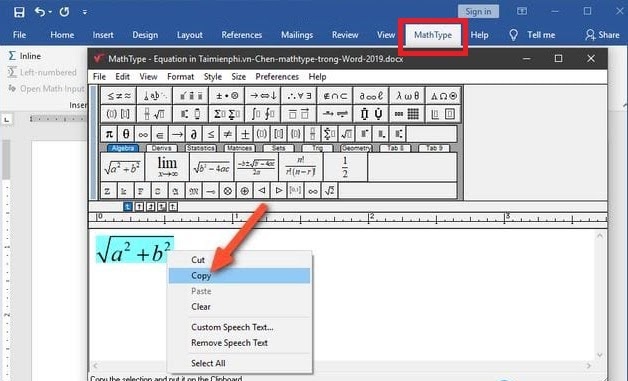
<p dir="ltr" style="text-align: justify;"><span style="font-size:14px;"><span style="font-family:Arial,Helvetica,sans-serif;">Đây là phần mềm thương mại giúp bạn có thể soạn thảo công thức Toán học, sau khi cài đặt nó sẽ được tích hợp trong bộ Office của Microsoft. Ngoài tính năng chính là soạn thảo công thức, phần mềm này có một số công cụ giúp chúng ta chuyển đổi công thức sang nhiều định dạng khác nhau.</span></span></p>

<div style="text-align:center"><img alt="cach chen mathtype vao van ban trong word 2019 8" height="364" src="https://thithutructuyen.com/uploads/news/2021_06/cach-chen-mathtype-vao-van-ban-trong-word-2019-8.jpg" width="600" /></div>

<p dir="ltr" style="text-align: justify;"><em><span style="font-size:14px;"><span style="font-family:Arial,Helvetica,sans-serif;">&nbsp;=&gt; Tải về phiên bản mới nhất và tiến hành cài đặt tại đây: <a href="http://www.dessci.com/en/products/mathtype/">http://www.dessci.com/en/products/mathtype/</a>&nbsp;</span></span></em></p>

<h3 dir="ltr" style="text-align: justify;"><strong>Chuyển đổi công thức Toán học sang hình ảnh</strong></h3>

<p dir="ltr" style="text-align: justify;"><span style="font-size:14px;"><span style="font-family:Arial,Helvetica,sans-serif;">Sau khi đã thực hiện tạo đề thi theo phần mềm Mathtype bạn tiến hành thực hiện các bước sau:</span></span></p>

<ul>
	<li aria-level="1" dir="ltr">
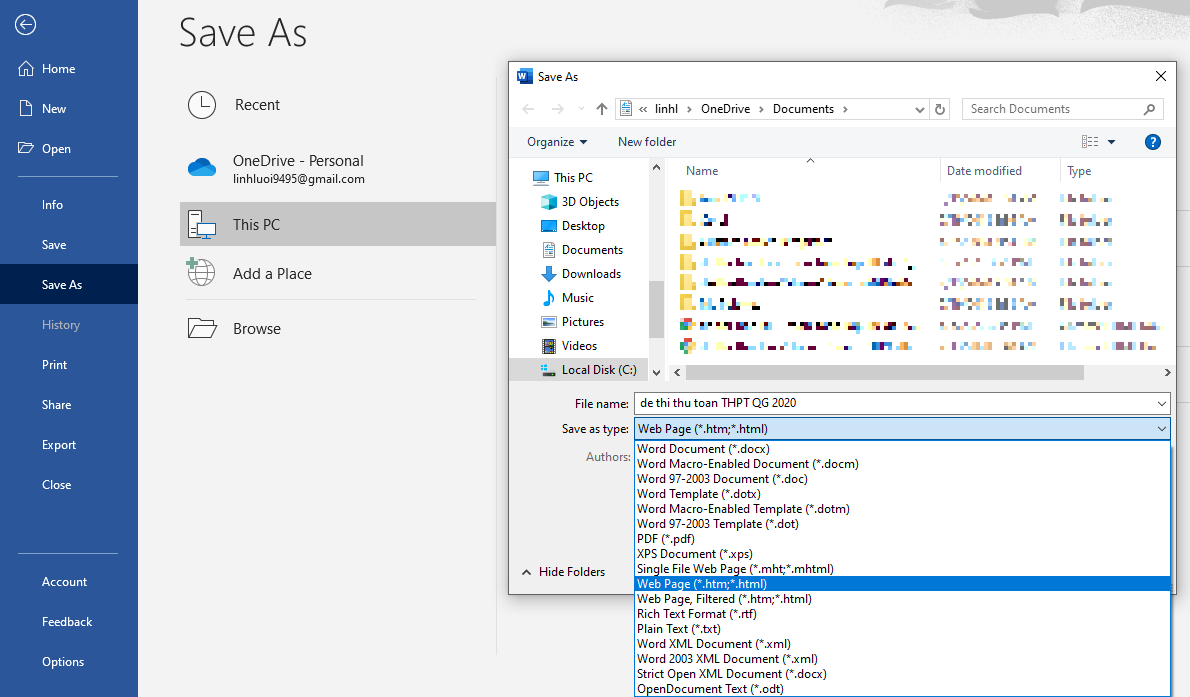
	<p dir="ltr" role="presentation" style="text-align: justify;"><span style="font-size:14px;"><span style="font-family:Arial,Helvetica,sans-serif;"><u><strong>Bước 1</strong></u>: Vào <strong>file</strong> -&gt; <strong>Save As</strong> -&gt; <strong>Document </strong>-&gt; Chọn <strong>WebPage</strong> =&gt; Bước này sẽ giúp các công thức Toán học có trong file đề thi được chuyển sang dạng image.</span></span></p>
	</li>
</ul>

<div style="text-align:center"><img alt="2" height="351" src="https://thithutructuyen.com/uploads/huong-dan-su-dung/2021_04/2_1.png" width="600" /></div>

<div style="text-align: justify;">&nbsp;</div>

<ul dir="ltr">
	<li style="text-align: justify;"><span style="font-size:14px;"><span style="font-family:Arial,Helvetica,sans-serif;">&nbsp;<u><strong>Bước 2</strong></u>: Vào folder bạn vừa lưu bài và mở file html</span></span></li>
</ul>

<div style="text-align:center"><img alt="2" height="351" src="https://thithutructuyen.com/uploads/news/2021_06/2.png" width="600" /></div>

<ul>
	<li aria-level="1" dir="ltr">
	<p dir="ltr" role="presentation" style="text-align: justify;"><span style="font-size:14px;"><span style="font-family:Arial,Helvetica,sans-serif;"><u><strong>Bước 3</strong></u>: Sau khi mở file html bạn vừa lưu chọn Ctrl + C (Copy tất cả các câu hỏi có chứa công thức Toán học đã được chuyển sang file ảnh)</span></span></p>
	</li>
	<li aria-level="1" dir="ltr">
	<p dir="ltr" role="presentation" style="text-align: justify;"><span style="font-size:14px;"><span style="font-family:Arial,Helvetica,sans-serif;"><u><strong>Bước 4</strong></u>: <strong>Paste</strong> (Dán) các câu hỏi vào file cũ -&gt; <strong>Save&nbsp;</strong></span></span></p>
	</li>
</ul>

<p dir="ltr" style="text-align: justify;"><em><span style="font-size:14px;"><span style="font-family:Arial,Helvetica,sans-serif;">*** Lưu ý: Xóa các khoảng trắng sau các câu hỏi (theo mẫu chuẩn mỗi câu chỉ cách nhau một khoảng trắng)</span></span></em></p>

<p dir="ltr" style="text-align: center;"><em><span style="font-size:14px;"><span style="font-family:Arial,Helvetica,sans-serif;"><iframe allow="autoplay;" allowfullscreen="" frameborder="0" height="480" scrolling="no" src="https://www.youtube.com/embed/7laWRW6Oukw?rel=0&amp;autoplay=1" width="600"></iframe></span></span></em></p>

<p dir="ltr" style="text-align: center;"><em>Video hướng dẫn cách import đề thi file word lên AZtest</em></p>

<h2 style="text-align: justify;"><strong>3. Thực hiện import câu hỏi cho đề thi</strong></h2>

<ul>
	<li>
	<p style="text-align: justify;"><span style="font-size:14px;"><span style="font-family:Arial,Helvetica,sans-serif;">Sau khi hoàn tất các bước chỉnh sửa đề thi theo cấu hình từ MS Word, bây giờ tiến hành import câu hỏi vào đề thi thuộc hệ thống&nbsp;AZtest.</span></span></p>
	</li>
	<li>
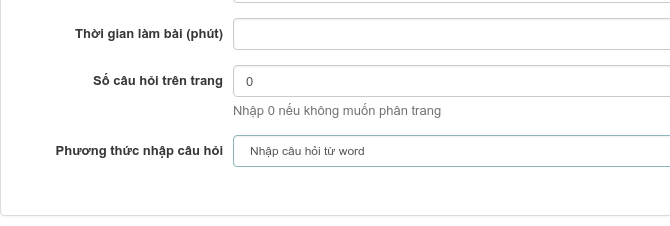
	<p style="text-align: justify;"><span style="font-size:14px;"><span style="font-family:Arial,Helvetica,sans-serif;">Trong khi tạo đề thi mới, bạn hãy chú ý đến phần&nbsp;Phương thức nhập câu hỏi, bạn hãy chọn&nbsp;Nhập câu hỏi từ word.</span></span></p>
	</li>
</ul>

<div style="text-align:center"><img alt="22 1" height="202" src="https://thithutructuyen.com/uploads/news/2021_06/22_1.png" width="600" /></div>

<ul>
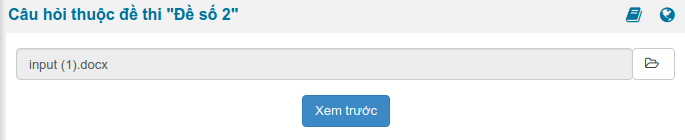
	<li style="text-align: justify;"><span style="font-size:14px;"><span style="font-family:Arial,Helvetica,sans-serif;">Sau khi tạo đề thi thành công, hệ thống sẽ chuyển bạn đến khu vực câu hỏi thuộc đề thi. Tại đây, bạn chọn đến tập tin MS Word đã thao tác ở các bước bên trên, nhấn&nbsp;Xem trước</span></span></li>
</ul>

<div style="text-align:center"><img alt="23 1" height="123" src="https://thithutructuyen.com/uploads/news/2021_06/23_1.png" width="600" /></div>

<ul>
	<li style="text-align: justify;"><span style="font-size:14px;"><span style="font-family:Arial,Helvetica,sans-serif;">Hệ thống sẽ trình bày nội dung từ MS Word lên giao diện web, bạn có thể xem lại nội dung đề thi tại giao diện này.</span></span></li>
</ul>

<blockquote>
<p style="text-align: justify;"><span style="font-size:14px;"><span style="font-family:Arial,Helvetica,sans-serif;">Nếu phát hiện lỗi, hệ thống sẽ thông báo chi tiết lỗi ở bên dưới mỗi câu hỏi, bạn cần sửa hết các lỗi (nếu có) trước khi&nbsp;Cập nhật&nbsp;dữ liệu vào đề thi</span></span></p>
</blockquote>

<ul>
	<li style="text-align: justify;"><span style="font-size:14px;"><span style="font-family:Arial,Helvetica,sans-serif;">Thực hiện nhấn&nbsp;Cập nhật&nbsp;để hoàn tất việc import đề thi.</span></span></li>
</ul>

<p dir="ltr" style="text-align: justify;"><span style="font-size:14px;"><span style="font-family:Arial,Helvetica,sans-serif;">Trên đây là các bước nhập câu hỏi trắc nghiệm từ Microsoft Word lên website thi trắc nghiệm. Trong quá trình sử dụng nếu có điều gì thắc mắc cần được hỗ trợ hãy liên hệ ngay với chúng tôi theo số hotline <strong>0233 777 4455</strong> (Ext 3) để được tư vấn, hỗ trợ tận tình nhất.&nbsp;<br  />
<em><strong>&gt;&gt;&gt; Nguồn:&nbsp;<a href="https://aztest.vn/tai-lieu/huong-dan/huong-dan-cach-nhap-cau-hoi-tu-microsoft-word-42.html">https://aztest.vn/tai-lieu/huong-dan/huong-dan-cach-nhap-cau-hoi-tu-microsoft-word-42.html</a></strong></em></span></span></p>
		</div>
	</div>
	<div id="footer" class="clearfix">
		<div id="url">
			<strong>URL của bản tin này: </strong><a href="https://thithutructuyen.com/news/tin-tuc-thong-bao/huong-dan-cach-nhap-cau-hoi-tu-microsoft-word-579.html" title="Hướng dẫn cách nhập câu hỏi từ Microsoft Word">https://thithutructuyen.com/news/tin-tuc-thong-bao/huong-dan-cach-nhap-cau-hoi-tu-microsoft-word-579.html</a>

		</div>
		<div class="clear"></div>
		<div class="copyright">
			&copy; Hệ thống thi trắc nghiệm trực tuyến
		</div>
		<div id="contact">
			<a href="mailto:cuccntt@moet.edu.vn">cuccntt@moet.edu.vn</a>
		</div>
	</div>
</div>
        <div id="timeoutsess" class="chromeframe">
            Bạn đã không sử dụng Site, <a onclick="timeoutsesscancel();" href="https://thithutructuyen.com/#">Bấm vào đây để duy trì trạng thái đăng nhập</a>. Thời gian chờ: <span id="secField"> 60 </span> giây
        </div>
        <div id="openidResult" class="nv-alert" style="display:none"></div>
        <div id="openidBt" data-result="" data-redirect=""></div>
<div id="run_cronjobs" style="visibility:hidden;display:none;"><img alt="" src="/index.php?second=cronjobs&amp;p=t8lmd8er" width="1" height="1" /></div>
<script src="https://thithutructuyen.com/assets/js/jquery/jquery.min.js"></script>
<script>var nv_base_siteurl="/",nv_lang_data="vi",nv_lang_interface="vi",nv_name_variable="nv",nv_fc_variable="op",nv_lang_variable="language",nv_module_name="news",nv_func_name="savefile",nv_is_user=0, nv_my_ofs=-4,nv_my_abbr="EDT",nv_cookie_prefix="nv4c_a9vJI",nv_check_pass_mstime=1738000,nv_area_admin=0,nv_safemode=0,theme_responsive=1,nv_is_recaptcha=0;</script>
<script src="https://thithutructuyen.com/assets/js/language/vi.js"></script>
<script src="https://thithutructuyen.com/assets/js/global.js"></script>
<script src="https://thithutructuyen.com/themes/cuccntt/js/news.js"></script>
<script src="https://thithutructuyen.com/themes/cuccntt/js/main.js"></script>
<script src="https://thithutructuyen.com/themes/cuccntt/js/bootstrap.min.js"></script>
</body>
</html>